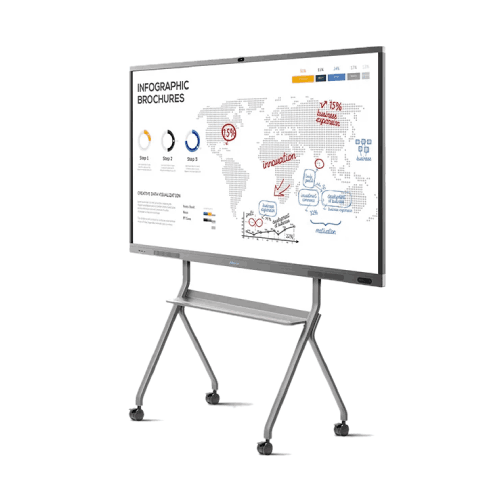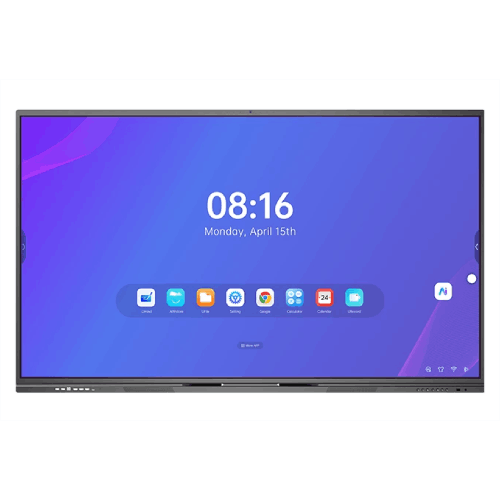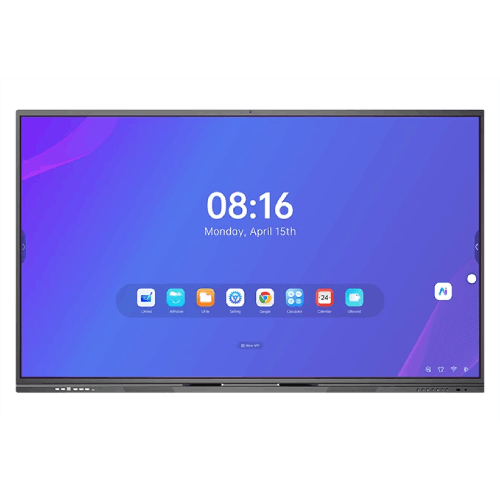
Riotouch LTF75RK3576 75-inch Interactive Display
Regular Price:৳0.00Availability: SKU: 4.58.74.9564
Quick Overview
-
Support
Saturday – Thursday: 09 AM - 06 PM. -
Payment
Cash on Delivery | Card | Online Payment -
Shipping Cost
Inside Dhaka 100tk | Outside Dhaka 150tk -
Warranty Policy
Read More
Description
Riotouch LTF75RK3576 75-inch Interactive Display in Bangladesh
The Riotouch LTF75RK3576 75-inch Interactive Display is built to be the digital centerpiece of modern classrooms, lecture halls, training centers, and boardrooms in Bangladesh. Taking the core strengths of Riotouch’s RK3576 interactive platform and scaling it to a larger 75-inch 4K canvas, this model is ideal for medium to large spaces where clear visibility and active participation are critical.
While exact internal specs for this specific size may vary by configuration, the LTF75RK3576 series typically follows the same philosophy as its 65-inch counterpart: a 4K UHD screen, powerful smart processing, advanced multi-touch, and rich connectivity—all packed into a single, robust interactive panel.
Big, Bright 75-inch 4K UHD Canvas for Larger Rooms
A 75-inch 4K UHD display (3840 × 2160) is a significant step up in presence and visibility compared to smaller boards. In real-world Bangladeshi environments:
- In a school classroom of 40+ students, those sitting at the back can still clearly see text, diagrams, and images.
- In a university lecture hall or corporate training room, the larger screen size makes complex charts and presentations easier to follow.
- In boardrooms and conference rooms, a big screen makes digital whiteboarding and remote participants more visible to everyone.
4K resolution ensures:
- Fine text appears sharp and legible even when showing detailed tables or code.
- High-resolution images, videos, and diagrams retain clarity during zooming and annotation.
- Split-screen or multi-window usage (e.g., whiteboard plus content) still looks crisp.
Many Riotouch panels also employ anti-glare tempered glass to reduce reflections, crucial in bright classrooms or offices with overhead lighting and windows. This helps maintain comfortable viewing throughout the day.
Smart Performance with Rockchip RK3576 Platform (Series Design)
The LTF75RK3576 series is based around the Rockchip RK3576 platform—an octa-core ARM-based processor family that is well-suited for interactive displays. Though exact CPU/RAM/ROM values can vary by specific SKU or region, the RK3576 series is generally designed to deliver:
- Smooth navigation through the user interface and menus
- Fast app launching and switching
- Responsive inking and annotation on top of documents, slides, or browser pages
Paired with sufficient system memory and onboard storage, it provides the smart “brain” behind the panel—reducing or eliminating the need for an always-connected external PC for many tasks. Teachers or presenters can run whiteboard apps, view documents, play videos, or browse the web directly on the display’s built-in system.
Some configurations of the RK3576 platform also integrate AI acceleration (NPU), enabling enhanced features in supported software—such as handwriting recognition, shape recognition, and smarter camera-based functions when a compatible camera is installed.
For Bangladeshi schools and businesses, this means you can treat the Riotouch LTF75RK3576 like a giant interactive tablet: turn it on, open your apps, and start teaching, training, or presenting—with or without a PC.
Interactive IR Touch for Collaborative Work
A defining feature of the Riotouch LTF75RK3576 is its advanced IR touch technology, engineered for multi-user interaction:
- Multi-point touch support (often up to dozens of points on Windows, and multiple points on the built-in Android system, depending on configuration)
- High precision for accurate writing and drawing
- Low touch latency, making inking feel immediate and natural
In practice:
- Several students can come up and write on the screen together—solving math problems, labeling diagrams, or brainstorming ideas.
- In a corporate workshop, multiple team members can draw workflows, highlight content, or move sticky-note style elements simultaneously.
- The presenter can quickly annotate over slides, websites, or videos, then save or share the results.
Compared to older projector-and-pen setups that require calibration or have visible lag, an IR-based interactive flat panel like the Riotouch LTF75RK3576 provides a noticeably more modern and intuitive experience.
Audio and Video Collaboration Ready
Large interactive displays are often the center of hybrid learning and remote meetings, and the LTF75RK3576 series is designed with this in mind:
- Built-in speakers (commonly dual high-powered drivers) provide enough volume for a full classroom or meeting room, making videos and remote voices clearly audible.
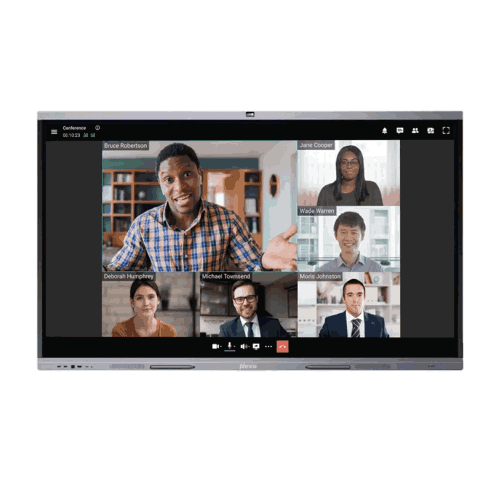
- Many Riotouch models support an optional camera and microphone array, turning the panel into a powerful video conferencing terminal when combined with platforms like Zoom, Microsoft Teams, Google Meet, or others.
For Bangladesh-based institutions:
- Schools can run hybrid classes where some students are in the room and others join online.
- Universities can connect guest lecturers from abroad.
- Businesses can hold client meetings and project reviews with remote teams or partners.
Instead of juggling a projector, separate speakers, a webcam, and whiteboard, the Riotouch LTF75RK3576 consolidates these functions into one central system when fully equipped.
Modern Connectivity for Laptops, Devices, and Networks
The Riotouch LTF75RK3576 typically includes a robust selection of ports and wireless options, in line with the RK3576 series:
- HDMI: For connecting desktop PCs, laptops, media players, or document cameras.
- USB ports (often USB 3.0): For flash drives, external storage, and peripherals.
- USB-C (on many RK3576-based models): Single-cable connection for compatible laptops, carrying video, touch input, and power (Power Delivery), simplifying cable management in meeting rooms.
- LAN and Wi-Fi (often Wi-Fi 6 on newer models): For high-speed network access, streaming content, and updating software.
In classrooms and offices around Bangladesh, where a mix of older and newer laptops is common, having both HDMI and USB-C ensures that nearly any device can connect easily. Wi-Fi connectivity (especially when paired with modern access points) lets teachers or trainers pull content from the internet, cloud drives, or local servers on demand.
Practical Use Scenarios in Bangladesh
1. Smart Classrooms in Schools and Colleges
The Riotouch LTF75RK3576 is large enough for typical Bangladeshi classrooms with 40–60 students:
- Teachers can replace traditional boards and projectors with one interactive display.
- Lessons can mix handwriting, digital content, and multimedia seamlessly.
- Students can come forward and solve problems or present group work directly on the screen.
2. University Seminar and Workshop Rooms
In seminar rooms or medium lecture halls:
- Professors can show research data, run simulations, or annotate diagrams live.
- Group discussions and workshops become more interactive as participants annotate together.
- Hybrid seminars with remote participants become smoother using integrated video-conferencing features.
3. Corporate Boardrooms and Meeting Spaces
For businesses in Dhaka, Chattogram, and other cities:
- The 75-inch screen size makes presentations clearly visible to everyone around the table.
- Teams can run brainstorming sessions and strategy meetings using digital whiteboards.
- Remote collaboration with branch offices or international partners is simplified.
4. Training Institutes and Skills Centers
Coaching centers, language institutes, vocational training centers, and corporate training labs can:
- Use interactive courseware and practice exercises.
- Record annotated sessions for later review.
- Host blended on-site/online sessions in one room.
5. Government, NGO, and Healthcare Training Rooms
Public-sector organizations and NGOs can:
- Deliver awareness campaigns and training sessions with powerful visuals.
- Easily adapt content for different audiences by annotating or rearranging slides on the fly.
- Support hybrid workshops that include participants from remote districts.
Design, Durability, and Bangladesh Environment
Riotouch interactive panels are typically designed with:
- Tempered glass that stands up to daily touching and writing.
- A robust, professional chassis suitable for fixed installation or mobile stands.
- Emphasis on long-term classroom and office use, rather than light home use.
In Bangladesh, where hardware may be used intensively across multiple sessions per day, this durability is very important. Glass that resists scratches and a frame built for frequent touching and cleaning means fewer worries about damage over time.
Proper mounting—either on a solid wall or a quality floor stand—ensures safety and stability. When installed in a well-ventilated room with reasonable climate control, the Riotouch LTF75RK3576 is well positioned to deliver years of service.
Basic Care and Maintenance Tips
- Clean the screen with a soft, dry or slightly damp microfiber cloth—avoid harsh chemicals or abrasive wipes.
- Do not press excessively hard with sharp objects; use finger or soft-tipped styluses recommended for touchscreens.
- Ensure adequate ventilation around the panel; avoid enclosing it tightly with no airflow.
- Periodically check mounting brackets or stand bolts to maintain secure installation.
These simple habits help keep the panel in optimal condition through daily use.
✅ Key Features
- Large 75-inch 4K UHD Display: Ideal size for medium to large classrooms and meeting spaces, ensuring clear visibility for all participants.
- RK3576 Smart Platform: Rockchip RK3576-based interactive series design delivers smooth performance for education and business apps (specs may vary by configuration).
- Advanced IR Multi-Touch: Supports multi-user interaction with high precision and low latency, perfect for group work and collaborative sessions.
- Integrated Audio: Built-in speakers provide clear audio for videos, lessons, and remote meetings without needing separate sound systems in many rooms.
- Video Conferencing Ready: Support for optional camera and microphone arrays enables effective hybrid education and remote collaboration.
- Flexible Connectivity: HDMI, USB, and typically USB-C and network options make it easy to connect PCs, laptops, and external devices.
- All-in-One Interactive Solution: Combines display, touch, audio, and smart computing in a single device, reducing need for projectors and extra hardware.
✅ Usage / Applications
- School and College Classrooms for interactive teaching, digital lessons, and student presentations.
- University Lecture and Seminar Rooms for research presentations, interactive discussions, and hybrid seminars.
- Corporate Boardrooms and Meeting Rooms for presentations, brainstorming, and video conferences.
- Training Institutes and Coaching Centers delivering exam prep, language courses, and professional skills training.
- Government and NGO Training Facilities running awareness programs, workshops, and planning sessions.
- Healthcare and Hospital Training Rooms for clinical training, staff orientation, and knowledge-sharing sessions.
- Innovation Labs and Co-working Spaces for collaborative design, ideation, and startup pitches.
✅ Benefits of This Product?
- Improves Engagement and Participation: The large touch-enabled surface invites interaction from students and team members.
- Replaces Multiple Devices: Functions as a display, whiteboard, speaker system, and collaboration hub in one unit.
- Supports Hybrid Learning and Meetings: Easily integrates with conferencing platforms when paired with camera and mic accessories.
- Enhances Clarity in Bigger Rooms: Large 75-inch 4K screen ensures everyone can see and follow content comfortably.
- Simplifies Setup and Operation: Teachers and presenters can start sessions quickly without complex projector or audio configurations.
- Future-Ready Connectivity: Modern ports and wireless capabilities ensure compatibility with current and upcoming devices.
- Durable for Daily Institutional Use: Built to handle frequent use in busy classrooms and offices across Bangladesh.
✅ Ideal For
The Riotouch LTF75RK3576 75-inch Interactive Display is ideal for institutions and organizations in Bangladesh that need a larger-format interactive solution for group environments.
It’s an excellent choice for schools, colleges, and universities that have mid-sized to large classrooms or lecture rooms and want students in the last row to clearly see content and participate easily. Corporate offices and training centers benefit from the expansive workspace for complex presentations, collaborative workshops, and in-depth training sessions.
Public-sector organizations, NGOs, and development projects running training and capacity-building programs across multiple regions can deploy this panel as a standard solution in their main training halls. EdTech companies and coaching centers looking to differentiate with a premium learning experience will also find the larger size compelling, especially for competitive exam coaching and interactive concept teaching.
In short, if you have a room where 10–40+ participants regularly gather to learn, discuss, or plan, the Riotouch LTF75RK3576 offers the scale, clarity, and interactivity needed to make those sessions more effective and engaging.
✅ Why Choose the Riotouch LTF75RK3576 75-inch Interactive Display?
Choosing the Riotouch LTF75RK3576 means selecting a solution that combines size, clarity, and interactivity in a way that’s finely tuned to modern Bangladeshi classrooms and workplaces.
The 75-inch 4K UHD screen delivers a commanding presence in any room, ensuring that even complex or detailed content is visible from a distance. The RK3576-based smart platform at the core of this series offers the ease-of-use of an integrated system—power it on, launch your apps, and you’re ready to present or teach without needing a dedicated external PC for every session.
The IR multi-touch technology encourages collaboration: multiple people can write, draw, and manipulate content simultaneously, which is crucial for student-centered learning and team-based work. Support for camera and mic integration allows the panel to handle hybrid teaching and remote meetings without requiring extensive AV setups.
On the practical side, the Riotouch LTF75RK3576 helps standardize your rooms: rather than juggling separate projectors, whiteboards, speakers, and webcams, you have a single, clean solution that simplifies training, support, and expansion. As demand for digital and blended experiences grows across Bangladesh, this kind of integrated 75-inch interactive display provides a strong, future-ready platform.
✅ Why Buy This Product from BME?
When you buy the Riotouch LTF75RK3576 75-inch Interactive Display from Business Machine & Equipment (BME), you’re partnering with a local technology provider that understands how interactive solutions are actually deployed in Bangladesh.
BME focuses on genuine, brand-specified hardware, so you get the real Riotouch model and configuration you plan for—not a generic alternative. This matters greatly for larger purchases where performance, reliability, and long-term support are critical.
For schools, universities, corporates, NGOs, and government projects, BME can assist with project planning and B2B quotations, making it easier to budget for multiple rooms or campuses. If you want to standardize a set of classrooms, meeting rooms, or training labs on a single interactive panel size, BME can help you plan quantities, installation timelines, and supporting accessories like stands or mounts.
Because BME is focused on the Bangladesh market, they are familiar with constraints such as typical room sizes, infrastructure conditions, and the increasing need for hybrid-ready AV setups. They can provide guidance on where a 75-inch panel fits best, what connectivity options you should plan for, and how to integrate the display into your existing network and teaching or meeting workflows.
By purchasing through BME, you gain both the hardware and a local knowledge partner, helping ensure that your investment in Riotouch interactive displays delivers the educational and business impact you expect.
✅ Buying Guide
Before ordering the Riotouch LTF75RK3576 75-inch Interactive Display, consider the following practical steps to ensure you choose the right setup and get the best results.
1. Match Screen Size to Room Dimensions
- 75 inches is ideal for medium to larger rooms where participants sit further from the screen.
- For classrooms of 30–60 students or boardrooms with 10–20 seats, 75 inches typically offers good visibility across the room.
2. Decide on Mounting vs. Mobile Stand
- Wall mounting is best for permanent installations in dedicated classrooms or meeting rooms.
- A mobile floor stand is useful if you need to share the display among several rooms or reconfigure training spaces frequently.
3. Plan Connectivity for Daily Use
- Identify which devices will connect regularly (teacher laptops, presenter PCs, media players).
- Make sure you have the right cables (HDMI, USB-C where applicable) and that cable lengths and routing are planned to avoid clutter.
- Consider a small connection hub area near the display so teachers or presenters can plug in easily.
4. Network and Internet Access
- Decide whether the panel will use Wi-Fi only or also a wired LAN connection for more stable network access.
- For schools and offices with many devices online, ensure your Wi-Fi infrastructure can handle the additional load.
5. Video Conferencing Setup
- If you plan to use the panel for online classes or remote meetings, plan for:
- A compatible camera mounted at appropriate height and angle.
- Microphones that can capture voices from across the room (often a mic array or ceiling mic).
- Integration with your chosen conferencing apps (Zoom, Teams, Google Meet, etc.).
6. Teacher and Staff Orientation
- Allocate time for training teachers, trainers, and staff to use the panel’s whiteboard, annotation tools, and connectivity features.
- Create simple usage guides or have a short demonstration session for each department.
7. Common Mistakes to Avoid
- Mounting the screen too high for younger students to reach comfortably.
- Ignoring network capacity—using old routers and expecting flawless Wi-Fi in a crowded environment.
- Underestimating content organization; keep a clear folder structure for lessons and presentations.
- Skipping basic security settings on the panel (screen lock, app controls) when installed in public-access areas.
Thoughtful planning before purchase and installation will help you unlock the full potential of the Riotouch LTF75RK3576 across your classrooms or meeting spaces.
✅ Customers Ask About / Frequently Asked Questions
Q1: Is the Riotouch LTF75RK3576 suitable for large Bangladeshi classrooms and training halls?
A: Yes. The 75-inch 4K screen size is ideal for medium to larger rooms, ensuring students or participants at the back can clearly see content.
Q2: Do I need a separate PC to use this interactive display?
A: Not necessarily. The RK3576-based smart platform allows many tasks—like whiteboarding, browsing, and media playback—to be done directly on the panel. You can still connect a PC or laptop when needed via HDMI or USB-C (where supported).
Q3: Can multiple people write on the screen at once?
A: Yes. The IR touch system is designed for multi-touch interaction, allowing several users to write, draw, or move objects simultaneously, depending on software and OS.
Q4: Is this display good for online or hybrid teaching?
A: Yes. When paired with a suitable camera and microphones, it becomes an effective hub for hybrid classes and remote meetings using common conferencing platforms.
Q5: Is the panel durable enough for everyday school use?
A: It is built for institutional use with tempered glass and a robust chassis, suitable for regular use in classrooms and training centers when properly installed.
Q6: Does it support wireless connectivity?
A: Yes. The series is designed with Wi-Fi support (often Wi-Fi 6 on newer configurations), allowing access to online resources and updates without a physical network cable.
Q7: What kind of stand or mount do I need?
A: Use a VESA-compatible wall mount or floor stand rated for 75-inch displays and the panel’s weight. BME can guide you on compatible mounting solutions.
Q8: Can BME help design a multi-room deployment for our institution?
A: Yes. BME can provide guidance and quotations for deploying the Riotouch LTF75RK3576 across multiple classrooms, training labs, or meeting rooms.
✅ Why Buy This Product
The Riotouch LTF75RK3576 75-inch Interactive Display delivers the scale, clarity, and interactivity needed to modernize serious learning and collaboration spaces in Bangladesh. With its large 4K screen, smart RK3576 platform, multi-touch capability, and robust connectivity, it replaces projectors, basic TVs, and traditional whiteboards with a single, powerful solution.
By choosing this 75-inch interactive panel, you enable teachers, trainers, and professionals to present, annotate, collaborate, and connect with remote participants from one integrated system. The result is more engaging lessons, more effective meetings, and a smoother hybrid experience—whether you are running a school, university, training institute, corporate office, or government facility.
Order the Riotouch LTF75RK3576 75-inch Interactive Display from Business Machine & Equipment (BME) to bring a large-format, future-ready interactive solution to your classrooms, seminars, and boardrooms. Elevate your digital environment and give your users a platform that supports the way they need to work and learn—today and in the years ahead.
What is the price of Riotouch LTF75RK3576 75-inch Interactive Display in Bangladesh?
Write a review
Question Answer
Have question about this product? Get specific details about this product from expert.