


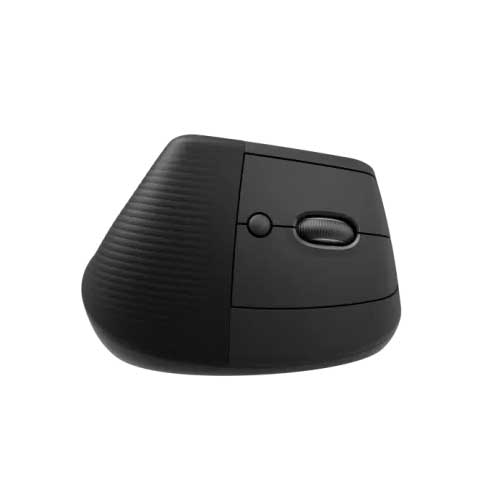
Logitech Ergo Series Lift Vertical Ergonomic Mouse
Regular Price:৳6,800.00Availability: SKU: 9.61.83.9071
Quick Overview
-
Support
Saturday – Thursday: 09 AM - 06 PM. -
Payment
Cash on Delivery | Card | Online Payment -
Shipping Cost
Inside Dhaka 100tk | Outside Dhaka 150tk -
Warranty Policy
Read More
Description
Logitech Ergo Series Lift Vertical Ergonomic Mouse in Bangladesh
The Logitech Ergo Series Lift Vertical Ergonomic Mouse is designed for people who work on computers for many hours a day and want to protect their wrist, arm, and shoulder from strain. In Bangladesh, more professionals, freelancers, and students are spending long days on laptops and desktops—often using small, flat mice that can cause discomfort over time.
The Logitech Lift offers a more natural 57° vertical “handshake” position, which helps reduce twisting of the forearm. This can make everyday work—like using Excel, browsing the web, editing documents, coding, or designing—more comfortable over long sessions.
Whether you are in an office in Gulshan, a bank in Motijheel, a design studio in Banani, or working from home in Chattogram, the Lift vertical mouse is an excellent option if you are:
- Feeling pain or stiffness in your wrist or forearm.
- Using a laptop trackpad all day and feeling uncomfortable.
- Looking for a more ergonomic setup for long-term health.
Vertical Design for a More Natural Handshake Posture
Traditional flat mice force your forearm to twist so your palm faces down. Over time, this posture can contribute to strain and discomfort. The Logitech Lift is different: it holds your hand in a more vertical, handshake-like position.
Benefits of the vertical design:
- Reduced forearm pronation – Less twisting of the bones in your arm.
- More relaxed shoulder and wrist – Your hand rests in a more natural angle.
- Better comfort over long sessions – Helpful for people working 8–10 hours on a PC.
For a typical Bangladeshi office worker who spends the day on spreadsheets, emails, and internal software, this change in posture can make a noticeable difference. Many users report feeling less tension at the end of the day when using a vertical mouse compared to a standard mouse.
Compact Size for Small to Medium Hands
The Logitech Lift is specifically designed with small to medium hands in mind, which is suitable for many users in Bangladesh. The curved shape supports the palm, and the thumb rest gives your thumb a place to relax instead of gripping the mouse tightly.
This is beneficial for:
- Office professionals who use the mouse all day.
- Teachers and administrators working on education portals and e‑learning platforms.
- Freelancers in design, writing, data entry, or customer support.
- Students doing project work, online classes, and research.
If you have found larger ergonomic mice uncomfortable or difficult to handle, the Lift’s more compact and friendly shape may fit your hand better.
Wireless Freedom with Multiple Connectivity Options
The Logitech Lift Vertical Ergonomic Mouse supports both:
- Bluetooth Low Energy
- Logitech USB receiver (Logi Bolt / Unifying-style, depending on version)
This makes it easy to connect the mouse to:
- Desktop PCs in offices.
- Laptops at home or on the go.
- Compatible tablets or secondary devices (where supported).
You can keep your desk in Dhaka, Sylhet, or Khulna free of cable clutter and easily move the mouse between devices if needed. The connection is designed to be stable for typical office distances, so you can work comfortably without lag or drop-outs.
Multi-Device and Multi-OS Support
In modern Bangladeshi workplaces, many people use more than one device:
- Office desktop PC plus a personal laptop.
- Windows PC and a MacBook.
- Laptop and tablet for presentations and meetings.
The Lift can connect to multiple devices (up to three, depending on configuration) and switch between them, making it highly flexible for:
- IT professionals managing several systems.
- Managers who move between a desktop and a laptop.
- Teachers jumping between personal and school devices.
It supports major operating systems like Windows and macOS, and commonly works with others that recognise standard Bluetooth or USB mice.
Designed to Reduce Noise – Great for Shared Spaces
The Logitech Lift includes quiet buttons and scroll wheel, making it suitable for:
- Open-plan offices in Dhaka and Chattogram.
- Libraries and study rooms in universities.
- Work-from-home setups in shared apartments or family homes.
Silent or low-noise operation is important in Bangladesh because many people share a single room or workspace. A quieter mouse helps you stay productive without disturbing others.
Precision and Smooth Tracking for Everyday Work
The Lift is not a gaming mouse, but it provides reliable, precise tracking that is well-suited to:
- Office applications: Word, Excel, PowerPoint, email clients.
- Web browsing and research.
- Basic design and content work in tools like Canva or simple photo editing.
- Video calls and conferencing tools like Zoom, Teams, and Google Meet.
You can adjust pointer speed and behaviour through your computer’s settings or, on supported systems, via Logi Options+ software, which can also enable extra customisation features.
Customisation with Logi Options+ (Where Supported)
On compatible systems, you can use Logi Options+ to:
- Reassign buttons – For example, set thumb buttons to go Back/Forward in the browser, or to launch frequently used apps.
- Create app-specific profiles – Different button actions in Excel, Photoshop, or browsers.
- Fine-tune scrolling and pointer behaviour – Adjust to your working style.
For Bangladeshi professionals in finance, HR, design, or data entry, these customisations can save time every day by reducing repetitive actions and shortcuts you need to remember on the keyboard.
Long Battery Life for Hassle-Free Use
The Logitech Lift is designed for long battery life (exact duration depends on the battery type and usage). For practical purposes in Bangladesh:
- You can typically use it for months before changing the battery.
- You do not have to worry about charging cables.
- It remains ready for use even during heavy office workdays.
This is especially useful in organisations where many users rely on battery-operated devices—less downtime, less support work for IT staff.
Ideal for Health-Conscious and Comfort-Focused Users
In Bangladesh, awareness of posture, back pain, and repetitive strain injury (RSI) is growing. As more people work in IT, call centres, freelancing, and corporate environments, ergonomic devices like the Lift are becoming a smart investment.
The Lift is suitable if:
- Your wrist feels sore after using a flat mouse all day.
- You want to prevent long-term issues from constant computer usage.
- You are setting up a healthier home office with an ergonomic chair and desk.
Paired with a good keyboard and seating position, the Lift helps create an overall ergonomic workstation.
Perfect for Offices, Institutions, and Remote Work in Bangladesh
Practical Bangladeshi use cases for the Logitech Ergo Series Lift include:
- Corporate offices: Banks, telecoms, software companies, and multinational firms.
- NGOs and international organisations: For staff who do heavy documentation and reporting.
- Universities and research institutes: For academic staff, lab managers, and researchers.
- Call centres and support desks: For agents handling long shifts.
- Remote workers and freelancers: Working from apartments, hostels, and shared homes.
BME can support both individual buyers and organisations that want to offer more ergonomic equipment to their staff.
✅ Key Features
- Vertical Ergonomic Design – 57° handshake-style posture to reduce wrist and forearm strain during long computer use.
- Compact Shape for Small to Medium Hands – Curved, supportive body and thumb rest designed to fit many users comfortably.
- Wireless Connectivity (Bluetooth + USB Receiver) – Connect via Bluetooth or a Logitech receiver for flexible use with desktops and laptops.
- Multi-Device Support – Pair with multiple devices and switch between them (configuration-dependent).
- Quiet Buttons and Scrolling – Low-noise operation suitable for shared and quiet environments.
- Customisable Buttons with Logi Options+ (Where Supported) – Personalise button functions and app-specific shortcuts.
- Long Battery Life – Designed for months of use on a single battery in typical office conditions.
✅ Usage / Applications
- Office and Corporate Work – Emails, documents, spreadsheets, presentations, HR and finance tasks.
- IT, Programming, and Development – Comfortable pointing and scrolling for long coding sessions and system administration.
- Design and Content Creation – For light to moderate design, layout, and content tasks where comfort is important.
- Online Teaching and Learning – For teachers delivering online classes and students attending lectures and doing assignments.
- Remote and Hybrid Work – For professionals splitting time between home and office.
- NGOs, Banks, and Institutions – For staff who do extensive computer-based reporting and documentation.
- Health-Focused Setups – For anyone in Bangladesh trying to build an ergonomic, long-term workstation.
✅ Benefits of This Product?
- Reduced Strain and Discomfort – Vertical posture helps ease wrist and forearm tension for heavy computer users.
- More Natural Hand Position – Handshake-style angle supports a relaxed, neutral arm alignment.
- Improved Comfort Over Long Hours – Office workers, freelancers, and students can work longer with less fatigue.
- Quieter Working Environment – Low-noise clicks and scrolling help maintain a calm workspace at home or in the office.
- Flexible Connectivity – Easily connect to both desktops and laptops, with or without Bluetooth.
- Better Productivity – Customisable buttons save time on common actions in browsers and office apps.
- Professional Appearance – Modern, clean design that looks at home in corporate offices and home workspaces.
✅ Ideal For
- Office professionals and managers in Dhaka, Chattogram, Sylhet, and other cities who work long hours on computers.
- Developers, analysts, and IT staff with constant mouse usage alongside the keyboard.
- Designers and content creators who prefer comfort over many small, fast mouse movements.
- Teachers, lecturers, and students participating in online classes and research.
- Freelancers and remote workers building ergonomic home offices.
- SME owners and HR departments seeking to reduce staff discomfort and improve workplace ergonomics.
- Anyone with wrist or forearm discomfort from using a traditional mouse.
✅ Why Choose the Logitech Ergo Series Lift Vertical Ergonomic Mouse?
- Purpose-Built for Ergonomics – Not a generic mouse; designed from the ground up to support a healthier posture.
- Balanced Between Comfort and Familiarity – Vertical enough to help your wrist, but not so extreme that it feels alien to most users.
- Strong Brand and Ecosystem – Part of Logitech’s Ergo series, integrating well with other Logitech products.
- Real-World Friendly Design – Quiet buttons, compact form, and long battery life fit real Bangladeshi office and home environments.
- Supports Long-Term Health – A small investment compared to the cost of chronic wrist or arm issues from years of heavy computer use.
✅ Why Buy This Product from BME?
- Genuine Logitech Ergo Series Product for Bangladesh – BME focuses on authentic, officially sourced units.
- Official Warranty Support – Easier service and warranty claims through an established local supplier.
- Experience with Corporate and Institutional Clients – BME can advise on deploying ergonomic devices across teams or offices.
- Bulk and Project Supply Capability – Suitable if your organisation wants to provide ergonomic mice to multiple employees.
- Professional Sales Consultation – Guidance on whether the Lift suits your hand size, work style, and environment.
- Reliable Delivery Across Bangladesh – Supply to Dhaka, Chattogram, and other districts, subject to logistics.
- Proper Documentation and Invoices – Useful for corporate procurement, NGOs, and tender requirements.
✅ Buying Guide
1. Understand Your Pain Points and Goals
- If you experience wrist, forearm, or shoulder discomfort, or want to prevent long-term problems, an ergonomic mouse like the Lift is a strong option.
- If you are comfortable with a traditional mouse and mainly play fast-paced games, you may prefer a performance-focused gaming mouse instead.
2. Check Your Hand Size
- The Logitech Lift is best suited for small to medium hands.
- If your hands are very large, you may want to test the fit or consider other ergonomic models designed for larger hands.
3. Evaluate Your Workspace Setup
- If you work at a fixed desk, a vertical mouse fits well into an ergonomic setup with proper chair and keyboard placement.
- For laptop-only use, combining the Lift with a laptop stand and external keyboard can make your posture much better.
4. Confirm Connectivity Requirements
- Ensure your PC or laptop has Bluetooth or at least one free USB-A port for the Logitech receiver.
- If you plan to switch between multiple devices, check multi-device pairing capabilities.
5. Consider Software Customisation
- If you want to customise buttons and behaviours, check that your operating system supports Logi Options+.
- If you do not need customisation, the Lift still works as a plug-and-play mouse.
6. Think Long-Term Health and ROI
- An ergonomic mouse can help reduce discomfort and potential medical costs over time.
- For employers in Bangladesh, providing ergonomic devices can improve staff comfort and productivity.
7. Verify Authenticity, Warranty, and Price with BME
- Ask BME about warranty duration and coverage.
- Ensure you receive a sealed, original Logitech product with a valid invoice.
- For the latest Logitech Lift Vertical Ergonomic Mouse price in Bangladesh, check BME’s website or contact their sales team. Bulk buyers should request project or institutional pricing.
✅ Customers Ask About / Frequently Asked Questions
Q1: Who should use the Logitech Lift Vertical Ergonomic Mouse?
Answer: It is ideal for users who work long hours on a computer and feel wrist or forearm discomfort, or those who want to prevent such issues. This includes office workers, IT staff, designers, students, and freelancers in Bangladesh.
Q2: Is it difficult to get used to a vertical mouse?
Answer: There may be a short adjustment period of a few days as your muscles adapt to the new posture. Most users become comfortable quickly and then find traditional mice feel more straining.
Q3: Does the Logitech Lift work with both Windows and Mac?
Answer: Yes. It is designed to work with Windows and macOS, and usually functions as a standard mouse on other OSes that support USB/Bluetooth mice.
Q4: Can I connect the Lift to more than one device?
Answer: Yes, the Lift can typically pair with multiple devices (such as a PC, laptop, and tablet) and switch between them, depending on configuration. Check specific features when purchasing from BME.
Q5: Is this mouse good for gaming?
Answer: The Lift is primarily designed for ergonomics and office productivity. While it can be used for casual gaming, serious competitive gamers may prefer a dedicated gaming mouse like the Logitech G series.
Q6: What kind of battery does the Lift use and how long does it last?
Answer: The Lift uses a replaceable battery (such as AA, depending on model) and is designed for long battery life in normal office use. Exact duration depends on usage.
Q7: Do I need software to use the Lift?
Answer: No. It works as a standard mouse without software. However, Logi Options+ adds customisation options for buttons and behaviour on supported systems.
Q8: Is the Lift suitable for left-handed users?
Answer: The standard Lift shape is optimised for right-handed use. If you are left-handed, check with BME if a specific left-hand variant is available.
Q9: Does it help with carpal tunnel syndrome?
Answer: While it is not a medical treatment, the more neutral wrist and arm position can help reduce strain. For specific medical conditions, consult a doctor or physiotherapist, and use ergonomic devices as part of an overall setup.
Q10: What warranty does BME provide for the Logitech Lift?
Answer: BME supports the official Logitech warranty for Bangladesh. Confirm the exact warranty period and terms at the time of purchase.
✅ Why Buy This Product
- Helps protect your wrist and arm during long hours of computer use.
- Ideal for Bangladesh’s growing desk-based workforce, from corporate employees to freelancers.
- Compact, quiet, and wireless, fitting naturally into modern home and office setups.
- Backed by Logitech’s ergonomic design expertise and BME’s local warranty and support, making it a safe and practical choice for health-conscious users.
What is the price of Logitech Ergo Series Lift Vertical Ergonomic Mouse in Bangladesh?
Write a review
Question Answer
Have question about this product? Get specific details about this product from expert.






Logitech M196 Bluetooth Mouse

Logitech M235 Wireless Mouse

Logitech B170 Wireless Mouse

Logitech M240 Silent Bluetooth Mouse


Logitech B175 Wireless Mouse
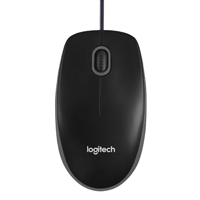
Logitech B100 Optical USB Mouse
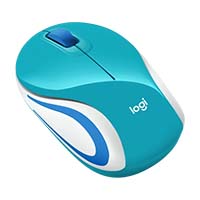
Logitech M187 Mini Wireless Mouse
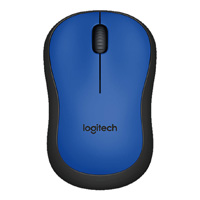
Logitech M221 Silent Wireless Mouse


Logitech MX Master 4 Wireless Mouse

Logitech MX MASTER 3S Lite Wireless Mouse


Logitech Signature M650 Wireless Mouse


