

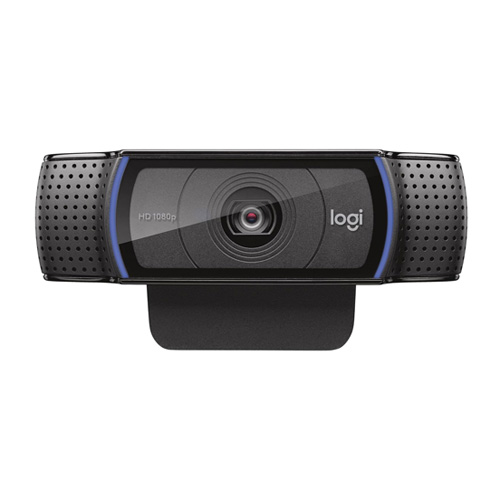
Logitech C920e Business Meetings Webcam
Cash Price: ৳9,650.00 Regular Price:৳9,950.00Availability: In Stock SKU: 9.69.83.3075
Quick Overview
-
Support
Saturday – Thursday: 09 AM - 06 PM. -
Payment
Cash on Delivery | Card | Online Payment -
Shipping Cost
Inside Dhaka 150tk | Outside Dhaka 250tk -
Warranty Policy
Read More
Specification
| Brand | Logitech |
| Model | C920e |
| Camera | 3 Mega Pixel |
| Focus Type | Autofocus |
| Lens Type | Glass |
| Built-In Mic` | Stereo |
| Mic Range | Up To 3 Ft (1 M) |
| Diagonal Field Of View (DFoV) | 78° |
| Digital Zoom | 1x |
| Multiple Resolutions | 1080p/30fps (up to 1920 x 1080 pixels) |
| USB Connectivity | USB-A Plug-And-Play |
| Compatibility | Windows 7 Or Later,MacOS 10.10 Or Later,Chrome OS |
| Warranty | One (01) Year Warranty |
Description
Buy Logitech C920e Business Meetings Webcam Price in Bangladesh.
The Logitech C920e is a professional-grade HD webcam designed to deliver superior video quality for all your conferencing, Video Calling And Recording, Dual Stereo Audio, Stream Gaming and streaming needs. Logitech C920e HD 1080p Mic-Enabled Webcam, certified for Zoom, Microsoft Teams compatible, TAA Compliant + Litra Glow Premium LED Streaming Light with TrueSoft, adjustable monitor mount.
The Litra Glow Premium LED Streaming Light is designed to provide professional-quality lighting for video conferencing, streaming, and content creation. With Logitech’s TrueSoft technology, this LED light delivers balanced, full-spectrum light with cinematic color accuracy. Its compact and versatile design makes it an essential tool for enhancing your on-camera presence. It captures stunningly sharp and detailed 1080p full HD video at 30 frames per second, ensuring that you always look your best in any setting. With built-in dual stereo microphones, the C920e captures natural audio from all directions, providing a clear and lifelike audio experience. the Logitech C920e webcam with the Litra Glow LED light creates a powerful setup for any professional needing high-quality video and audio. Whether you’re attending virtual meetings, hosting webinars, or streaming content, this combination ensures you are seen and heard clearly.
The Logitech C920e Business Meetings Webcam is a Full HD USB webcam developed for professional communication and everyday business collaboration. It is designed for individuals, corporate teams, educational institutions and organisations that need clear video for virtual meetings, remote work, online presentations and training sessions.
With video resolution up to 1920 × 1080 at 30 frames per second, a glass lens, HD autofocus and Logitech RightLight 2 automatic light correction, the C920e helps users maintain a clear, professional appearance during video calls. Its fixed 78-degree diagonal field of view is designed to frame an individual naturally while leaving enough room to show relevant items in the surrounding workspace.
Full HD 1080p video quality
The C920e supports Full HD video at 30 fps, providing detailed visuals for business meetings, online interviews, remote presentations and virtual training. It also supports 720p video at 30 fps, allowing compatible applications to use a lower resolution when appropriate.
HD autofocus for clear presentations
The integrated autofocus system adjusts the camera's focus automatically. This helps maintain a clear image during meetings and presentations without frequent manual adjustments.
Logitech RightLight 2 technology
RightLight 2 automatically adjusts the image to changing lighting conditions, helping users remain visible in a variety of indoor environments. Good room lighting is still recommended for the best results.
Dual integrated omnidirectional microphones
Two integrated microphones capture voices from different directions, with a recommended pickup distance of up to one metre. This supports natural audio for individual video calls and everyday online meetings.
Setup note: On supported C920e versions, the microphones may need to be enabled through the Logi Tune application. Check the exact model revision and software requirements before deployment.
78-degree field of view
The fixed 78° diagonal field of view is suited to individual users who want to remain the main focus of a meeting. It can also show a limited amount of the surrounding desk or workspace without using an excessively wide view.
Attachable privacy shutter
The included privacy shade can be positioned over the lens when the webcam is not in use. This provides a simple physical way to block the camera's view and is particularly useful for shared office workstations and home offices.
USB-A plug-and-play connectivity
The C920e connects through a USB-A interface and uses a 1.5-metre attached cable. It is compatible with supported computers and video applications, making installation straightforward for many office environments.
Flexible mounting and workstation integration
The universal mounting clip fits compatible laptops, LCD screens and desktop monitors. A standard tripod mounting thread allows alternative positioning when a compatible tripod is available; the tripod is sold separately.
Business collaboration software support
The webcam works with common video conferencing applications, including Microsoft Teams, Zoom and Google Meet, subject to the operating system, application version and configuration. Logitech also provides Logi Tune software for supported camera adjustments and device management.
Setup and Installation:
- USB Connection: Simply connect the webcam to your computer using the USB cable. It is plug-and-play, so no additional drivers are usually required.
- Flexible Mounting Options: The webcam can be mounted on your monitor, laptop screen, or on a tripod for flexible positioning.
- Software Integration: Use with Logitech Capture software for additional control over your recording and streaming settings.
- Positioning: Place the webcam at eye level to create a natural and engaging angle. Position the Litra Glow light slightly above your head to provide even lighting across your face.
- Background: Ensure your background is not overly cluttered. Use the 78-degree field of view of the C920e to frame your shot effectively.
- Lighting Adjustment: Adjust the Litra Glow light’s brightness and color temperature to complement your room’s lighting conditions. Natural light can also be used in conjunction with the LED light for a balanced look.
- Power Source: Plug the light into a power source using the included cable. It is designed to be simple and straightforward.
- Mounting: Attach the light to your monitor or laptop using the adjustable mount. The flexible arm allows you to position the light to achieve the best angle.
- Adjust Settings: Use the controls to adjust the brightness and color temperature according to your needs. Experiment with different settings to find what works best for your environment.
Use Cases:
- Professional Meetings: Enhance your video conferencing experience with high-quality video and audio.
- Streaming and Content Creation: Perfect for live streaming, vlogging, and creating video content for platforms like YouTube and Twitch.
- Online Teaching: Ideal for educators conducting virtual classes, providing clear video and sound for effective teaching.
- Video Conferencing: Ensure you are well-lit during video calls, making you look more professional and engaging.
- Live Streaming: Enhance your streams with high-quality lighting that highlights your features and adds production value.
- Content Creation: Perfect for filming videos, vlogging, and taking high-quality photos with consistent and reliable lighting.
- Professional Photography: Use as a portable lighting solution for photography, ensuring your subjects are evenly lit and vibrant.
Technical Specifications
|
Specification |
Details |
|---|---|
|
Brand |
Logitech |
|
Product name |
C920e Business Webcam |
|
Model |
C920e |
|
Colour |
Black |
|
Product category |
Business webcam |
|
Maximum video resolution |
Full HD 1920 × 1080 |
|
Maximum Full HD frame rate |
30 fps |
|
HD video mode |
1280 × 720 at 30 fps |
|
Camera resolution |
3 megapixels |
|
Lens type |
Glass |
|
Focus type |
Autofocus |
|
Field of view |
78° diagonal |
|
Light correction |
Logitech RightLight 2 |
|
Microphones |
Dual integrated omnidirectional microphones |
|
Microphone pickup distance |
Up to approximately 1 metre |
|
Digital zoom |
Up to 1× |
|
Connectivity |
USB-A plug-and-play |
|
USB protocol |
USB 2.0 |
|
Cable length |
Approximately 1.5 metres |
|
Privacy feature |
Attachable privacy shutter |
|
Mounting |
Universal clip and 1/4-inch tripod thread |
|
Dimensions with clip |
Approximately 94 × 71 × 43.3 mm |
|
Weight |
Approximately 162 g |
|
Compatible systems |
Supported Windows, macOS and ChromeOS systems; selected Android setups |
|
Video applications |
Microsoft Teams, Zoom, Google Meet and other compatible applications |
|
Warranty |
Confirm the applicable local seller or manufacturer warranty |
|
Common part numbers |
960-001401 and 960-001360, depending on region and version |
Specifications are based on Logitech's published product information. The exact part number, microphone configuration and compatibility should be checked against the supplied regional version.
Key Features and Benefits

1. Full HD 1080p video
Delivers detailed video at up to 30 fps for professional meetings, virtual presentations and online training.

2. Glass lens with HD autofocus
Helps maintain sharp visuals as the subject or scene changes during video calls.

3. RightLight 2 automatic light correction
Adjusts image characteristics to help improve visibility in different lighting environments.

4. Attachable privacy shutter
Physically covers the camera lens when video capture is not required, giving users more control over visual privacy.

5. Dual omnidirectional microphones
Capture voice from up to approximately one metre away for everyday business calls and online collaboration.

6. USB-A connectivity
Connects to compatible computers through a familiar USB interface for straightforward workstation setup.

7. Universal mounting clip
Allows convenient placement on compatible laptop screens and desktop monitors.

8. Tripod mounting support
Provides additional positioning options for presentations, recording and flexible desk arrangements.

9. Business video application compatibility
Works with popular conferencing platforms to support remote meetings, interviews and team collaboration.
10. Compact business-ready design
Fits individual workstations and supports consistent webcam deployment across office teams.
Usage and Applications
-
Corporate meetings: Participate in virtual meetings with colleagues, clients and business partners.
-
Remote work: Improve video communication from home or a remote workstation.
-
Online education: Support virtual classes, tutoring and remote training.
-
Recruitment and interviews: Conduct online interviews with clear video and integrated audio.
-
Professional presentations: Deliver product demonstrations and screen-sharing sessions.
-
Customer service: Support video consultations and remote assistance.
-
Consultancy and freelancing: Communicate with customers and collaborators through video conferencing.
-
Training departments: Run virtual workshops and internal employee training.
-
Small and medium businesses: Equip employee workstations with a consistent Full HD webcam.
-
Personal video calls: Support everyday video communication with family and friends.
Benefits of the Logitech C920e Business Webcam
-
Professional video presentation: Full HD resolution helps create a clear image during meetings.
-
Convenient focusing: Autofocus reduces the need to adjust the camera manually.
-
Improved lighting adaptability: RightLight 2 helps maintain visibility in changing indoor lighting.
-
Integrated audio: Dual microphones support everyday voice communication without requiring a separate microphone.
-
Greater visual privacy: The attachable shutter physically blocks the camera lens.
-
Straightforward installation: USB-A connectivity simplifies setup on compatible computers.
-
Flexible positioning: The mounting clip and tripod thread accommodate different workstation layouts.
-
Business application support: Compatible conferencing platforms make it practical for routine office collaboration.
-
Consistent deployment: The model is suitable for organisations equipping multiple employees with similar webcams.
-
Compact workstation footprint: Its small design fits standard desk and monitor setups.
Why Choose the Logitech C920e?
The Logitech C920e is a practical choice for professionals who want a dedicated business webcam with Full HD video, autofocus, dual microphones and a physical privacy accessory.
Compared with a basic built-in laptop camera, it offers a dedicated camera lens, a defined 78° field of view and flexible monitor or tripod mounting. Its privacy shutter is particularly useful in workplaces where camera privacy matters.
Choose the C920e if your priorities include:
-
Full HD video at 30 fps.
-
Clear individual framing for meetings.
-
Integrated microphones for everyday conversations.
-
A physical lens cover.
-
USB connectivity and flexible mounting.
-
Compatibility with common business conferencing applications.
Important distinction: The C920e and C920 HD Pro are related but different models. The C920e includes an attachable privacy shutter and is positioned specifically for business collaboration. Do not assume that specifications or accessories are identical across every regional version.
Why Buy from BME?
Business Machines & Equipment (BME), operated by BME Solutions (BD) Limited, supplies ICT products and office equipment to businesses and individual customers in Bangladesh.
When purchasing the Logitech C920e Business Webcam from BME, customers can enquire about:
-
Current pricing and stock availability.
-
Product model and packaging verification.
-
Applicable warranty and support terms.
-
Compatibility with office computers and video meeting platforms.
-
Quotations for corporate and bulk purchases.
-
Delivery and payment arrangements.
Buying Guide
Before purchasing the Logitech C920e in Bangladesh, consider these points:
-
Confirm the exact model. Verify that the product is C920e rather than C920, C920s or another similar webcam.
-
Check the part number. Regional versions may have different part numbers and microphone configurations.
-
Check your computer's compatibility. Ensure the operating system supports the webcam and that a suitable USB-A port is available.
-
Consider your video requirements. Confirm whether 1080p at 30 fps meets your meeting and recording needs.
-
Review microphone setup. Check whether Logi Tune is required to enable or adjust the integrated microphones on your version.
-
Check mounting requirements. Make sure the included clip fits your monitor or laptop screen; purchase a compatible tripod separately if needed.
-
Confirm the privacy accessory. Check that the attachable privacy shutter is included in the package.
-
Verify warranty and authenticity. Request confirmation of product origin, applicable warranty and seller terms before ordering.
Frequently Asked Questions:
Q1. What is the price of the Logitech C920e Business Webcam in Bangladesh?
The available BME listing shows a cash price of ৳12,350 and a regular price of ৳12,850. Contact BME or check the live product page for current pricing and stock.
Q2. Does the Logitech C920e support Full HD 1080p?
Yes. It supports Full HD video at up to 1920 × 1080 resolution and 30 frames per second.
Q3. Does the C920e have built-in microphones?
Yes. It has two integrated omnidirectional microphones designed to capture voice from up to approximately one metre away. Microphone activation may require Logi Tune on supported versions.
Q4. Does the Logitech C920e have autofocus?
Yes. Its integrated HD autofocus helps keep the user in focus during video calls.
Q5. Does the C920e include a privacy shutter?
Yes. It includes an attachable privacy shade that can cover the lens when the camera is not in use.
Q6. Is the Logitech C920e compatible with Microsoft Teams and Zoom?
Yes. It is designed for business video conferencing and supports compatible versions of Microsoft Teams, Zoom and other popular platforms.
Q7. Can I use the C920e for Google Meet?
Yes. It can work with Google Meet on compatible computers and browsers, subject to the operating system and application requirements.
Q8. Can I mount the C920e on a tripod?
Yes. It has a standard tripod mounting thread. A tripod is not included in the standard package.
Q9. Does the Logitech C920e support low-light correction?
Yes. Logitech RightLight 2 automatically adjusts the image for different lighting conditions. Adequate lighting is still recommended for the best video quality.
Q10. What is the difference between Logitech C920e and C920 HD Pro?
Both support Full HD 1080p video at 30 fps and autofocus. The C920e is designed for business meetings and includes an attachable privacy shutter. Verify the exact model and accessories before comparing regional packages.
Q11. Is the C920e suitable for corporate offices?
Yes. Its Full HD video, integrated microphones, USB connectivity and privacy shutter make it suitable for employee workstations and business video meetings.
Q12. Where can I buy the Logitech C920e in Bangladesh?
You can enquire through BME Online Shop or contact BME Bangladesh at 0967 8814452.
Logitech C920e Full HD 1080p Business Meetings Webcam
The Logitech C920e Business Meetings Webcam is designed for professional video conferencing, remote work, online education and business communication. It delivers Full HD video at up to 1920 × 1080 resolution and 30 frames per second, helping users maintain a clear and professional appearance during virtual meetings.
Featuring a glass lens, HD autofocus, Logitech RightLight 2 automatic light correction and dual integrated omnidirectional microphones, the C920e supports clear everyday video communication. Its fixed 78-degree diagonal field of view is designed for individual users, while the included attachable privacy shutter provides a convenient way to cover the camera lens when it is not in use.
With USB-A connectivity, a universal mounting clip and tripod mounting support, the Logitech C920e is suitable for compatible desktop computers, laptops and business workstations.
Buy the Logitech C920e Business Meetings Webcam from BME Bangladesh. Contact BME to confirm current pricing, availability, warranty and delivery options.
What is the price of Logitech C920e Business Meetings Webcam in Bangladesh?
Write a review
Question Answer
Have question about this product? Get specific details about this product from expert.
Logitech C920 HD Pro Black Webcam
Logitech C922 Pro HD Stream Webcam
Logitech C505 High-Definition Webcam

Logitech C270 Widescreen HD Webcam

Logitech C310 High-Definition Webcam

Logitech C920e Business Meetings Webcam


Voltan 12V-12AH UPS Battery
Logitech C920e Business Meetings Webcam


Logitech MX Brio Ultra HD 4K Webcam


Logitech C310 High-Definition Webcam
Logitech C270 Widescreen HD Webcam
Logitech C505 High-Definition Webcam
Logitech C922 Pro HD Stream Webcam

