HP Thunderbolt G4 Docking Station (4J0A2AA)
Regular Price:৳0.00Availability: SKU: 9.105.5.5042
Quick Overview
-
Support
Saturday – Thursday: 09 AM - 06 PM. -
Payment
Cash on Delivery | Card | Online Payment -
Shipping Cost
Inside Dhaka 150tk | Outside Dhaka 300tk -
Warranty Policy
Read More
Description
Buy HP 4J0A2AA Thunderbolt G4 Docking Station in Bangladesh
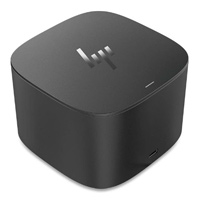
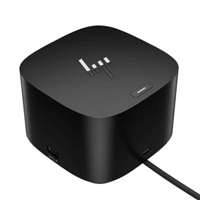
The HP Thunderbolt 120W G4 Docking Station (4J0A2AA) is built for users who want the convenience of a desktop workstation without giving up the mobility of a laptop. A single connection between the compatible notebook and the dock can provide access to multiple displays, USB accessories, wired Ethernet and laptop charging.
The dock features Thunderbolt 4, USB Type-C, four USB Type-A ports, two DisplayPort 1.4 outputs, HDMI 2.0 and Ethernet supporting both 1Gb and 2.5Gb networking. HP specifies support for up to four external displays, depending on the notebook's graphics capabilities and display configuration.
The 120W power configuration can provide up to 100W of power to a compatible host through USB-C Power Delivery, making it suitable for many business and professional laptops.
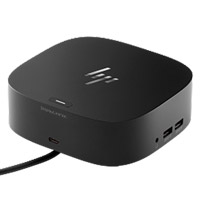
Its compact 98 × 98 × 68 mm design and approximately 760 g weight make it practical for a permanent desk setup or flexible office environment.
Technical Description
The HP Thunderbolt 120W G4 Dock (4J0A2AA) is a versatile connectivity and expansion solution for modern professional computing environments. Instead of connecting individual monitors, Ethernet cables, USB peripherals and other accessories directly to a notebook, users can connect the laptop to the docking station and manage their workstation from one central connection.
At the heart of the dock is Thunderbolt 4, providing high-speed connectivity for compatible systems and peripherals. The dock also supports USB-C DisplayPort Alt Mode, allowing compatible USB-C notebooks to use display and connectivity functions according to the capabilities of the host system. HP notes that USB-C Alt Mode functionality requires the host PC to support DisplayPort Alt Mode through its USB-C port.
For display connectivity, the dock provides two DisplayPort 1.4 ports, one HDMI 2.0 port, one Thunderbolt 4 connection and one USB-C DisplayPort Alt Mode connection. Depending on the notebook's video capabilities and configuration, the platform can support up to four external displays. HP specifies support for configurations including dual 4K at 60Hz and, on suitable DP 1.4 systems with DSC, triple 4K at 60Hz.
Network connectivity is another major strength. The Ethernet interface supports both 1Gb and 2.5Gb Ethernet, giving businesses greater flexibility when connecting modern laptops to high-speed wired networks, servers, NAS devices and enterprise infrastructure.
For peripherals, the dock provides four USB Type-A ports, including powered charging ports, along with a front USB Type-C port capable of USB 3.2 Gen 2 data transfer. This makes it easy to connect keyboards, mice, external storage, printers, scanners, card readers, headsets and other USB devices.
The HP Thunderbolt 120W G4 also supports enterprise-oriented management and security capabilities such as HP Sure Start, wired vPro management, PXE Boot, Wake on LAN and MAC address pass-through on supported configurations and HP systems. These capabilities make the dock particularly relevant to corporate IT environments where centralized device management and network control matter.
The dock uses a 120W power supply and can deliver up to 100W USB-C Power Delivery to a compatible host. The supplied system includes the dock, power supply, power cord and warranty documentation.
Key Features
- Thunderbolt 4 Connectivity: Provides a high-performance connection for compatible notebooks and Thunderbolt peripherals while simplifying the desktop setup.
- Up to 100W USB-C Power Delivery: Can provide up to 100W of power to a compatible host, helping users charge and operate supported laptops through the dock.
- Multi-Display Support: Supports up to four external displays on compatible systems, making it suitable for professional multitasking and extended desktop environments.
- Dual DisplayPort 1.4 Outputs: Allows compatible high-resolution DisplayPort monitors to be connected directly to the docking station.
- HDMI 2.0 Connectivity: Provides an additional convenient display interface for HDMI-compatible monitors, TVs and projectors.
- 2.5Gb Ethernet: Supports both 1Gb and 2.5Gb wired networking for faster and more flexible business network connectivity.
- Multiple USB Ports: Four USB Type-A ports plus USB-C connectivity provide convenient access to keyboards, mice, storage devices and other peripherals.
- USB 3.2 Gen 2: The front USB-C data port supports up to 10Gbps data connectivity for compatible devices.
- Enterprise Manageability: Features such as vPro management, PXE Boot, Wake on LAN and MAC address pass-through can simplify IT administration on supported systems.
- HP Sure Start Security: Provides firmware-level protection designed for supported HP environments.
- Compact Professional Design: Its approximately 98 × 98 × 68 mm footprint keeps the workstation organized without taking excessive desk space.
- Broad OS Compatibility: HP lists support for Windows, macOS and Chrome, with additional operating-system support documented by HP; available functions can vary according to the host platform.
Technical Specifications
| Specification | Details |
|---|---|
| Product Name | HP Thunderbolt 120W G4 Dock |
| Model / Product Number | 4J0A2AA |
| Dock Type | Thunderbolt 4 Docking Station |
| Power Supply | 120W |
| Host Power | Up to 100W via USB-C Power Delivery |
| Thunderbolt | 1 × Thunderbolt 4 |
| USB-C | USB-C 3.2 Gen 2 / DisplayPort Alt Mode connectivity |
| USB Type-A | 4 × USB Type-A |
| HDMI | 1 × HDMI 2.0 |
| DisplayPort | 2 × DisplayPort 1.4 |
| Ethernet | 1Gb / 2.5Gb Ethernet |
| Security | Kensington Standard Lock Slot, HP Sure Start |
| External Displays | Up to 4, depending on host capabilities |
| Power Delivery | USB PD 3.0, up to 100W host charging |
| Dimensions | 98 × 98 × 68 mm |
| Weight | Approx. 760 g |
| Operating Systems | Windows 10/11, macOS, Chrome OS and selected Linux/ThinPro configurations |
| Cable | 0.8 m host cable |
| Warranty | 1-year limited manufacturer warranty |
| Box Contents | Dock, power supply, power cord and warranty |
Specifications are based on HP's current product documentation and may vary by system configuration, operating system and regional SKU.
Usage / Applications
Corporate Offices
Connect a business laptop to monitors, wired LAN, keyboard, mouse and other office peripherals through one centralized docking point.
Home Office & Hybrid Work
Create a permanent workstation while keeping the laptop easy to disconnect when travelling or moving between work locations.
IT & Enterprise Deployment
The dock's management features can support enterprise network and device-management workflows on compatible HP systems.
Designers & Creative Professionals
Use multiple external displays for design applications, editing workflows, research, reference material and productivity tools.
Developers & Software Engineers
Connect multiple monitors, high-speed network infrastructure and USB peripherals for development environments.
Financial & Administrative Workstations
Suitable for users who need multiple screens for spreadsheets, ERP systems, dashboards, accounting applications and business communication.
Conference Rooms
Connect compatible notebooks to large displays or projectors while maintaining access to network and USB peripherals.
Professional Workstations
Useful for employees who regularly switch between mobile laptop use and a full desktop-style workstation.
Benefits of HP Thunderbolt 120W G4 Dock
One Connection for Your Workspace
Reduce cable clutter by bringing display, network, USB and charging connections together through the docking station.
Better Multitasking
Multiple external display options allow users to work across documents, applications, dashboards and communication tools simultaneously.
High-Speed Networking
The 2.5Gb Ethernet capability provides a faster wired-network option than conventional 1Gb connections when the network infrastructure supports it.
Laptop Charging Through the Dock
Compatible notebooks can receive up to 100W USB-C Power Delivery, reducing the need to manage a separate laptop charger at the desk.
Professional Desk Setup
The compact cube-style design keeps connectivity equipment organized and close to the workstation.
Easier IT Administration
Enterprise-oriented features can help IT teams manage compatible HP systems and network connections.
Why Choose HP Thunderbolt 120W G4 Dock?
The key advantage is connectivity without desk clutter.
For users working with a modern laptop, the HP Thunderbolt G4 Dock can act as the central connection point for displays, Ethernet, USB devices and power. Instead of plugging several cables into the notebook every morning, the user can connect the workstation through the dock's host connection.
It is especially attractive for organizations standardizing laptop-based workstations because HP provides a combination of Thunderbolt 4, multi-display support, high-speed Ethernet, USB expansion, Power Delivery and enterprise management capabilities in one solution.
Why Buy HP Thunderbolt G4 Dock from BME?
When purchasing a professional docking station in Bangladesh, the product itself is only part of the decision. Compatibility and genuine product sourcing also matter.
BME Bangladesh can help customers identify the appropriate docking solution based on the laptop model, available USB-C/Thunderbolt capabilities, monitor requirements and intended workplace setup.
BME advantages include:
- Genuine product sourcing based on available stock and supplier channels
- Bangladesh-focused product information and technical guidance
- Compatibility checking before purchase
- Support for business, corporate and individual customers
- Professional ICT product experience since 2003
- Delivery support for customers in Bangladesh
- Assistance with product specifications and quotation requirements
- After-sales support according to the applicable product warranty and BME terms
For current price, stock availability and delivery information, customers should confirm with BME before placing an order because imported ICT product availability and pricing can change.
Buying Guide
Before purchasing the HP Thunderbolt 120W G4 Dock 4J0A2AA, check these points:
1. Check Your Laptop Port
Confirm whether your laptop has Thunderbolt 3/4 or a USB-C port supporting DisplayPort Alt Mode, data and power functions. HP specifically notes that USB-C Alt Mode functionality depends on host support.
2. Check Laptop Charging Requirements
The 4J0A2AA is the 120W version and can provide up to 100W USB-C Power Delivery to compatible hosts. Make sure this is appropriate for your notebook's charging requirement.
3. Check Your Monitor Configuration
If you plan to use two, three or four monitors, check the notebook's GPU and video-output capabilities first. Dock capability alone does not guarantee every multi-monitor configuration.
4. Check Ethernet Requirements
If your office network uses 2.5Gb Ethernet, this dock's 1Gb/2.5Gb Ethernet support can be particularly useful.
5. Check Operating System
HP lists Windows, macOS and Chrome OS compatibility, while certain enterprise and Linux features may depend on the operating system and host system.
6. Confirm the Exact Product Number
Make sure the quotation or invoice specifies HP Thunderbolt 120W G4 Dock, 4J0A2AA, especially because the HP G4 family also includes other 120W and 280W variants.
Frequently Asked Questions
What is the HP Thunderbolt G4 Dock 4J0A2AA?
The HP Thunderbolt 120W G4 Dock 4J0A2AA is a professional docking station that expands a compatible laptop with Thunderbolt 4, USB, DisplayPort, HDMI, Ethernet and USB-C Power Delivery connectivity.
How much power can the HP 4J0A2AA provide to a laptop?
The 120W G4 configuration supports up to 100W of USB-C Power Delivery to the compatible host.
Does HP 4J0A2AA support Thunderbolt 4?
Yes. The dock includes a Thunderbolt 4 port for compatible host and peripheral connectivity.
How many monitors can HP Thunderbolt G4 support?
HP states that the G4 platform can support up to four external displays, depending on the notebook's video capabilities and configuration.
Does the HP Thunderbolt G4 have HDMI?
Yes. The dock includes one HDMI 2.0 port.
Does it have DisplayPort?
Yes. It includes two DisplayPort 1.4 outputs.
Does HP 4J0A2AA support 2.5Gb Ethernet?
Yes. HP specifies Ethernet support for 1Gb and 2.5Gb networking.
Can I use the dock with a non-HP laptop?
Compatibility depends on the laptop's Thunderbolt or USB-C implementation and operating system. HP notes that USB-C Alt Mode functionality requires the host PC to support DisplayPort Alt Mode. Some HP-specific features, including certain power-button and management functions, may not work on non-HP systems.
Does it work with Mac?
HP lists macOS among supported operating systems, although not every dock function is necessarily available on every Mac configuration.
What comes with the HP 4J0A2AA?
The package includes the dock, power supply, power cord and warranty documentation.
What is the size of the HP Thunderbolt 120W G4 Dock?
The dock measures approximately 98 × 98 × 68 mm and weighs approximately 760 g.
What is the warranty of HP 4J0A2AA?
HP lists a one-year limited manufacturer warranty.
Where can I buy HP Thunderbolt G4 Dock 4J0A2AA in Bangladesh?
Customers in Bangladesh can contact BME Bangladesh for current price, stock availability, delivery options and product compatibility guidance.
HP Thunderbolt 120W G4 Dock 4J0A2AA is a professional Thunderbolt 4 docking station with dual DisplayPort 1.4, HDMI 2.0, USB-C, four USB-A ports, 1Gb/2.5Gb Ethernet and up to 100W USB-C Power Delivery. It is designed to turn a compatible laptop into a multi-monitor desktop workstation with a single dock connection.
What is the price of HP Thunderbolt G4 Docking Station (4J0A2AA) in Bangladesh?
Write a review
Question Answer
Have question about this product? Get specific details about this product from expert.