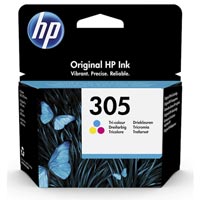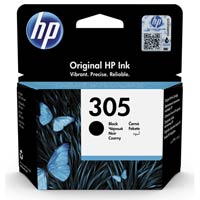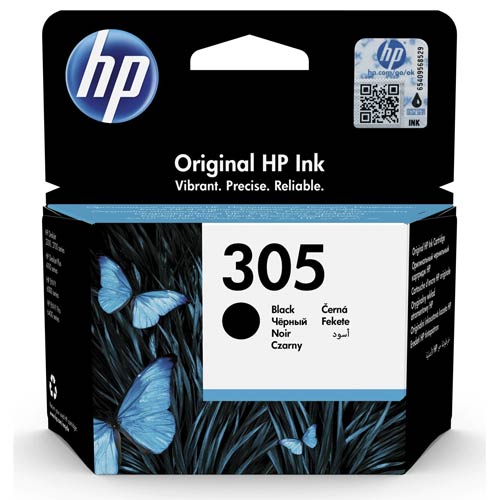
HP 305 Original Black Thermal Ink Cartridge
Regular Price:৳1,750.00Availability: SKU: 1.116.1.255
Quick Overview
-
Support
Saturday – Thursday: 09 AM - 06 PM. -
Payment
Cash on Delivery | Card | Online Payment -
Shipping Cost
Inside Dhaka 150tk | Outside Dhaka 300tk -
Warranty Policy
Read More
Description
HP 305 Original Black Ink Cartridge at Competitive Prices in Bangladesh
When searching for the best hp 305 black original ink cartridge price in Bangladesh, look no further than BME.com.bd. As a leading e-commerce retailer, BME offers competitive pricing on all HP products, including the HP 305 Original Black Thermal Ink Cartridge. Priced at an affordable ৳1,650, this genuine HP cartridge delivers excellent value for money, ensuring high-quality prints without breaking the bank. By purchasing from BME, you can be confident in receiving an authentic product that guarantees performance and reliability. Whether you're a professional, student, or business owner, BME's commitment to affordability ensures you get the best deal in the market.
Key Features of HP 305 Original Black Ink Cartridge Product in BD
- High-Quality Prints: The HP 305 cartridge is designed to produce sharp, clear text and vibrant images, making it ideal for both documents and photos.
- HP Thermal Inkjet Technology: Utilizes advanced HP Thermal Inkjet technology to ensure consistent and reliable printing performance.
- Page Yield: Offers a standard capacity with a yield of approximately 120 pages, perfect for moderate printing needs.
- Easy Installation: Features a straightforward installation process, allowing users to replace the cartridge quickly and easily without any technical expertise.
- Wide Compatibility: Compatible with a variety of HP DeskJet and HP DeskJet Plus printer models, including HP DeskJet 2320, 2710, 2720, and more.
- Cost-Effective: Compared to refill cartridges, the HP 305 provides up to 2x more prints, reducing the frequency of replacements and offering better value for money.
- HP Instant Ink Ready: Compatible with HP Instant Ink service, allowing users to save up to 50% on printing costs by paying for the pages they print rather than the ink itself.
- Durability: Ensures long-lasting performance and consistent print quality throughout its lifespan.
Benefits & Problem Solving of HP 305 Original Black Ink Cartridge
For professionals, tech enthusiasts, and businesses, the HP 305 Original Black Ink Cartridge addresses common printing challenges. The cartridge's high-quality prints ensure that every document is crisp and clear, which is essential for presentations and reports. Its easy installation means less downtime and more productivity, a crucial factor for busy offices. The compatibility with multiple printer models eliminates the hassle of finding the right cartridge. Moreover, the potential savings with HP Instant Ink service directly address cost concerns, making this cartridge a cost-effective solution for frequent users. By choosing the HP 305, you ensure reliable printing that meets the demands of your work or study.
Usage Scenarios of HP 305 Original Black Ink Cartridge
The HP 305 Original Black Ink Cartridge is versatile and suitable for various usage scenarios. For professionals and businesses, it ensures that all office documents, from reports to invoices, are printed with precision and clarity. Students can rely on it for printing assignments and study materials, ensuring that their work is presented professionally. Tech enthusiasts and gadget lovers will appreciate the cartridge's ability to produce high-quality prints for personal projects, such as photo albums or creative designs. The cartridge's moderate page yield and compatibility with multiple printer models make it an excellent choice for home offices and small businesses, providing reliable performance for everyday printing tasks.
FAQs About HP 305 Original Black Ink Cartridge
How do I install the HP 305 cartridge in my printer?
Installing the HP 305 cartridge is easy. Open your printer's ink cartridge access door, remove the old cartridge, and insert the new HP 305 cartridge into the designated slot. Ensure it clicks into place securely. Close the access door, and your printer should automatically recognize the new cartridge.
Can I recycle my used HP 305 ink cartridges?
Yes, HP offers a free recycling program for its cartridges. You can return used HP 305 cartridges to HP for recycling. Check the HP website or contact BME.com.bd for details on how to participate in the recycling program.
What should I do if my printer doesn't recognize the HP 305 cartridge?
If your printer does not recognize the HP 305 cartridge, try removing and reinstalling it. Ensure that the cartridge is inserted correctly and that no protective tape remains on the contacts. If the issue persists, restart your printer and check for any software updates. If these steps do not resolve the problem, contact HP customer support for further assistance.
How can I extend the life of my HP 305 ink cartridge?
To extend the life of your HP 305 ink cartridge, avoid printing in color when black-and-white prints will suffice, use draft mode for less important documents, and keep your printer turned off when not in use. Regularly use your printer to prevent the ink from drying out, and store cartridges in a cool, dry place when not in use.
Find the Best hp 305 black original ink cartridge price in bangladesh for You
For the best deals on the HP 305 Original Black Ink Cartridge, visit BME.com.bd. Whether you need it for professional use, academic purposes, or personal projects, BME offers competitive pricing and authentic products that meet your printing needs.
What is the price of HP 305 Original Black Thermal Ink Cartridge in Bangladesh?
Topics products
Write a review
Question Answer
Have question about this product? Get specific details about this product from expert.