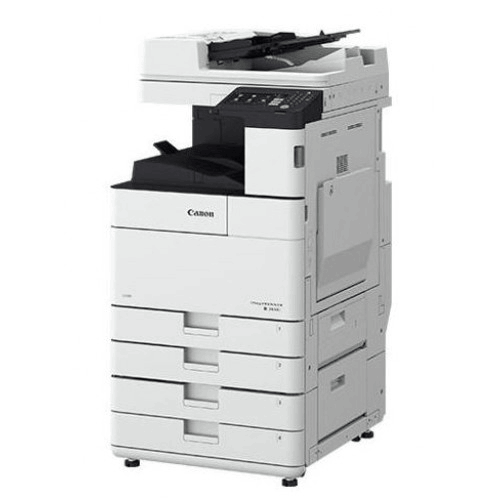
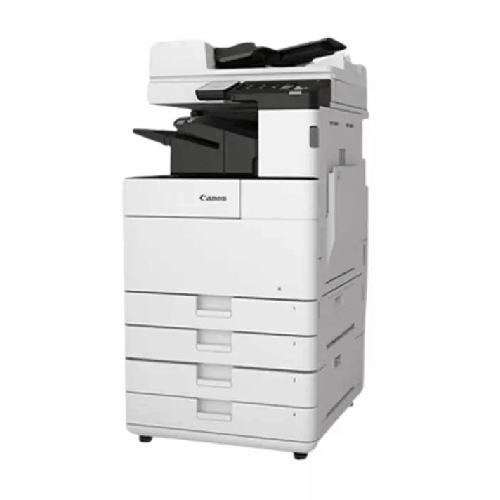
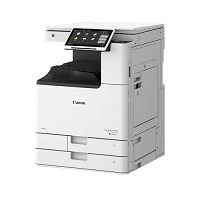
Canon IR 2630i Monochrome A3 Multifunction Laser Printer Digital Copier
Regular Price:৳0.00Availability: SKU: 1.1.7.9491
Quick Overview
-
Support
Saturday – Thursday: 09 AM - 06 PM. -
Payment
Cash on Delivery | Card | Online Payment -
Shipping Cost
Inside Dhaka 1000tk | Outside Dhaka 1500tk -
Warranty Policy
Read More
Description
Canon IR 2630i Monochrome A3 Multifunction Laser Printer Digital Copier in Bangladesh
The Canon IR 2630i Monochrome A3 Multifunction Laser Printer Digital Copier is built for busy Bangladeshi offices, schools, and businesses that need a reliable, high‑volume A3 copier, printer, and scanner in one machine. It’s part of Canon’s imageRUNNER series, known worldwide for solid build quality, stable performance, and low running costs in corporate and commercial environments.
In many offices across Dhaka, Chattogram, Gazipur, Narayanganj and beyond, printing and photocopying are still mission‑critical: invoices, HR documents, student handouts, government forms, reports, tender papers, admission files, exam scripts—the list goes on. The Canon IR 2630i is designed to handle exactly this type of day-in, day-out document workload with calm consistency.
Instead of juggling separate printer, copier and scanner units—or relying on a small desktop printer that constantly runs out of paper or toner—you put this one central A3 multifunction machine in your office or shop and let everyone work around it. The result: smoother workflows, less downtime, and a more professional, organized document process.
All‑in‑One A3 Monochrome Workhorse
The Canon IR 2630i is a monochrome A3 multifunction device. That means:
- It prints, for all your everyday black‑and‑white documents
- It copies, giving you a fast, digital photocopier for both A4 and A3
- It scans, so you can digitise documents and share them electronically across your office network
This “three-in-one” capability is especially valuable in Bangladesh where office space can be tight and IT budgets are closely watched. Instead of buying and maintaining three separate machines, you get:
- One device to manage
- One toner type to stock
- One service and maintenance plan to handle
For growing organizations, this simplifies procurement and daily operations, while still giving you the robust performance you need.
Monochrome Laser Quality for Business Documents
The Canon IR 2630i is a laser-based monochrome (black-and-white) system, tuned for sharp, professional text and graphics. It’s perfect for:
- Letters, memos, and approvals
- Bills, invoices, and delivery challans
- Internal reports and meeting minutes
- Contracts and legal paperwork
- Student handouts and exam papers
- Government forms and tender documents
While it doesn’t print in colour, that’s exactly what keeps running costs lower for organizations that mainly handle text-based documents. Each page comes out clean, crisp and consistent, even in heavy use environments, helping your business look serious and reliable.
Built for Busy Offices & Photocopy Environments
The Canon IR 2630i is designed for medium to relatively high volume usage. It’s not a tiny home printer—it’s meant for:
- Departmental use in companies
- Central printing in small to mid-sized offices
- Schools and colleges that print frequently
- Busy coaching centres and training institutes
- Photocopy & print shops that offer per-page service
Depending on your actual usage pattern and configuration, it can comfortably support daily printing and copying flows for a team or a whole floor. Paper input trays and optional extra cassettes (where fitted) mean you can:
- Load plenty of A4 paper for routine jobs
- Keep A3 sheets ready for plans, posters, registers, and folded documents
- Reduce how often staff have to reload paper
The machine is built for continuous duty, with durable internal components typical of Canon’s imageRUNNER line, making it suitable for long workdays in Bangladesh where work often runs past standard office hours.
Convenient Copying with A3 Capability
One of the big advantages of the IR 2630i over smaller devices is its ability to handle A3. In Bangladesh, A3 is often required for:
- Ledger books and manual registers
- Drawings and technical diagrams
- Wall notices and posters
- Large government or NGO forms
- College and coaching centre course materials
With an A3-capable flatbed and integrated feeder (model/option dependent), you can:
- Copy A3 originals directly
- Enlarge A4 to A3, or reduce A3 to A4 as needed
- Copy mixed-size sets (e.g. A4 and A3) in one run
This makes the IR 2630i a strong choice for organizations that need flexible document sizes and don’t want to outsource large-format black-and-white copying.
Network Printing & Office Integration
The Canon IR 2630i Monochrome A3 Multifunction Laser Printer Digital Copier is designed to be a true network device, not just a stand-alone copier:
- Network printing: Connect it to your LAN so multiple PCs and laptops in the office can print through it.
- Centralised printing: Set it as the main network printer for a department or floor.
- Print management: In many setups, user accounts or simple access control can be implemented to track and manage usage (depending on your software environment).
For Bangladesh offices upgrading from old-style stand‑alone copiers and USB printers, this is a big step forward. Instead of each desk handling its own inkjet or small laser printer, you:
- Route most jobs to the IR 2630i
- Enjoy consistent output and lower per-page cost
- Reduce headaches related to individual printer failures
It fits naturally into Windows-based office networks and common business environments used here.
Efficient Scanning & Digital Workflow
Modern offices in Bangladesh are slowly but surely shifting from purely paper-based processes to hybrid paper + digital workflows. The scanning functionality of the Canon IR 2630i supports this, letting you:
- Scan documents to a network folder or email (depending on configuration and network setup)
- Archive signed contracts, filled forms, handwritten notes, and application files
- Share documents digitally with management, colleagues, auditors, or remote team members
Instead of photocopying everything and physically storing multiple copies, you can:
- Keep one physical original
- Store and share the scanned digital version
- Reduce paper storage needs over time
For sectors like banks, NGOs, consultancies, educational institutions, and service companies, this shift to digital documentation is important for compliance, audit trails, and efficient collaboration.
User-Friendly Operation for All Staff
The Canon IR 2630i is designed to be easy to use, even for non-technical staff. Typical user-friendly elements include:
- A clear control panel and display (touch-based on many models in this series) with intuitive menus
- Simple options for choosing copy quantity, paper size, zoom, and duplex (double-sided)
- Dedicated buttons or shortcuts for common tasks, like ID card copy, collated sets, etc.
- Status indications for paper and toner levels so you’re warned before things run out
This is particularly helpful in Bangladeshi environments where:
- Office assistants, receptionists, or front desk staff may handle copying and printing
- Teachers, admin staff, or counter staff at service points need quick access to copies
- Multiple users share the same device throughout the day
By making daily operations simple, the IR 2630i reduces training time and mistakes, ensuring your team gets what they need without confusion.
Designed for Bangladesh Office Conditions
Bangladesh presents particular challenges for office equipment:
- High humidity and heat
- Dust and pollution in busy city areas
- Extended working hours
- Occasional power fluctuations
Canon’s imageRUNNER machines, including the IR 2630i, are built as robust office systems rather than lightweight home devices. With proper placement and basic care, they handle typical Bangladeshi conditions well:
- Place the machine in a ventilated area, away from direct sunlight and moisture
- Use a UPS or voltage stabilizer if your area is prone to significant voltage fluctuation
- Keep dust to a minimum around the device and paper storage area
These simple steps help maintain both print quality and machine longevity.
Real-Life Usage Scenarios in Bangladesh
To visualise how the Canon IR 2630i Monochrome A3 Multifunction Laser Printer Digital Copier fits into real work in Bangladesh, imagine a few examples:
-
Corporate Office in Gulshan
The HR and Accounts departments share an IR 2630i as their central document hub. HR prints appointment letters, ID card forms, and policy documents. Accounts prints invoices, salary sheets, and reports. All staff print over the network, and the copier function is used all day for filing and documentation. -
School/College in Dhanmondi
Teachers prepare class notes, question papers, and administrative documents in bulk. The IR 2630i handles A3 exam scripts and A4 handouts without delay. The scanning function is used to digitise old question papers and store them in the school’s archive. -
Coaching Centre in Mirpur
Hundreds of students receive printed practice sheets and model tests. The centre uses the IR 2630i to produce dozens of copies quickly, with crisp text that is easy for students to read. The A3 capability is handy for large-format answer keys and notices on the notice board. -
Photocopy & Print Shop near a University
The shop owner uses the IR 2630i as a key workhorse. Students come in with assignments on pendrives or email; staff print them, photocopy reference material from books, and enlarge or reduce documents as needed. The machine’s durability is important for long operating hours and heavy seasonal loads. -
NGO Head Office in Banani
Project teams print and copy reports, proposals, donor documentation, and field forms. Many documents are scanned for electronic submission. The IR 2630i functions as a central document point, saving time and ensuring consistent output.
Across all these environments, the IR 2630i proves its value as a dependable, central document engine.
Maintenance & Care for Long-Term Reliability
To keep your Canon IR 2630i running smoothly in Bangladesh:
- Use quality paper: Decent A4 and A3 paper reduces jamming and dust inside the machine.
- Replace toner and consumables on time: Follow on-screen warnings and service recommendations. Avoid using fake or very low-quality toner that may damage internal parts.
- Keep the glass and feeders clean: Wipe the scanner glass and document feeder area gently with a soft, lint-free cloth.
- Schedule periodic servicing: Arrange routine checkups and basic maintenance with a qualified technician to prevent issues before they become major.
- Ensure stable power: Use a surge protector or UPS where possible to protect electronics against voltage spikes.
Well-maintained, a machine like the IR 2630i can serve reliably for years, supporting your organization’s daily operations.
✅ Key Features
- A3 Monochrome Multifunction: Combines printing, copying, and scanning in one robust A3-capable machine for busy offices.
- High-Quality Laser Output: Produces crisp, professional black-and-white prints and copies ideal for business documents.
- Network-Ready Office Device: Connects to your LAN so multiple users and departments can share one powerful printer/copier.
- Productive for Medium-High Volumes: Designed to handle regular daily workloads for offices, schools, and copy shops.
- User-Friendly Control Panel: Intuitive interface that allows staff at all skill levels to operate copying, printing, and scanning functions with ease.
- Flexible Paper Handling: Supports A4, A3, and other common office sizes, with tray options for continuous, large jobs.
- Integrated Scanning for Digital Workflows: Enables document digitisation to support archiving, emailing, and electronic sharing.
- Reliable Canon imageRUNNER Platform: Built on Canon’s proven office copier/printer technology for stability and longevity.
✅ Usage / Applications
- Corporate offices and SMEs for everyday document printing, copying, and scanning
- Schools, colleges, and universities for question papers, handouts, notices, and administrative forms
- Coaching centres and training institutes needing frequent bulk copies and A3 materials
- Photocopy and print shops near campuses, courts, and commercial hubs
- NGOs, banks, and financial institutions for forms, reports, and compliance documents
- Government and semi-government offices with heavy paperwork flows
- Hospitals and clinics for patient forms, prescriptions, and reports
- Real estate and engineering firms for contracts, layout plans, and project documents
✅ Benefits of This Product?
- Centralises Document Work: One machine handles printing, copying, and scanning, reducing clutter and maintenance overhead.
- Lowers Per-Page Costs: Efficient monochrome laser technology and network sharing help keep long-term running costs under control.
- Boosts Office Productivity: Fast, reliable operation means less waiting at the printer and more time for core work.
- Improves Document Quality: Sharp text and clear graphics make your letters, reports, and forms look professional.
- Supports Digital Transformation: Built-in scanning helps your organization move towards paper+digital workflows.
- Saves Space: Combines multiple functions into a single footprint, ideal for space-conscious Bangladesh offices.
- Scales with Your Team: Networked access ensures new staff and departments can be added to the same machine easily.
- Trusted Brand Confidence: Backed by Canon’s reputation for office imaging equipment.
✅ Ideal For
The Canon IR 2630i Monochrome A3 Multifunction Laser Printer Digital Copier is ideal for small to medium and even larger offices in Bangladesh that need a dependable shared copier/printer/scanner rather than many small desktop units. If your team regularly prints and copies forms, letters, reports, and A3 documents, this machine gives you the firepower to keep up with demand.
It’s a perfect choice for schools, colleges, coaching centres, NGOs, corporate departments, banks, hospitals, and photocopy shops looking for an A3-capable, black-and-white workhorse. Organizations upgrading from older analog copiers or multiple low-end printers will especially appreciate the IR 2630i’s centralised efficiency, professional output, and digital scanning capability. If you want a machine that quietly does the “paper work” so your team can focus on real work, this model fits very well.
✅ Why Choose the Canon IR 2630i Monochrome A3 Multifunction Laser Printer Digital Copier?
Choosing the Canon IR 2630i means investing in a serious office-class device instead of a temporary or entry-level solution. Many Bangladeshi offices try to get by with small printers, only to struggle with frequent cartridge changes, jams, slow speed, and high cost per page. The IR 2630i solves these pain points by offering:
- A3 capability
- Genuine multifunction performance
- Solid construction meant for regular, sustained use
Compared to low-end options, it offers a lower total cost of ownership over time, especially in environments where hundreds or thousands of pages are printed each week. Compared to analogue or very old copiers, it adds network printing, modern control, and scanning, bringing your document handling up to today’s expectations.
Canon’s imageRUNNER line is widely used worldwide, including in Bangladesh, which means you benefit from a mature, proven platform with known behaviour and broad technical familiarity. If you’re setting up or upgrading a serious office environment and don’t want to worry about whether your copier/printer can keep up, the IR 2630i is a reliable, future-conscious choice.
✅ Why Buy This Product from BME?
Buying the Canon IR 2630i Monochrome A3 Multifunction Laser Printer Digital Copier from Business Machine & Equipment (BME) connects you with a Bangladesh-based office equipment specialist focused on supplying genuine products suited to local usage. Rather than guessing about compatibility or quality with unofficial imports, you work with a seller that understands how Canon copiers perform in real Bangladeshi offices, schools, and businesses.
BME can help you:
- Match the IR 2630i to your actual page volume and application needs
- Discuss placement, power considerations, and basic networking requirements
- Plan purchases for organizations with multiple departments or branches
For corporate and institutional customers, BME supports B2B procurement, offering quotations and necessary documentation suitable for tendering and internal approval processes. While installation, on-site setup, and after-sales specifics depend on agreement and geography, our intent is always to provide clear information and responsible handling as you integrate the IR 2630i into your workflow.
By sourcing through BME, you’re not only buying a machine—you are establishing a relationship with a local office equipment partner who understands that downtime on a copier/printer can directly affect your productivity and reputation.
✅ Buying Guide
Use this guide when considering the Canon IR 2630i Monochrome A3 Multifunction Laser Printer Digital Copier for your organization:
1. Estimate Your Monthly Volume
Roughly calculate how many pages you print and copy per month. The IR 2630i is suited to moderate to relatively high volumes. If your usage is very low, this may be more machine than you need; if it’s very high, you might need multiple units or careful planning.
2. Identify Print Sizes & Types
List which paper sizes you use most:
- A4 for most documents
- A3 for ledgers, posters, drawings
If A3 is important regularly, the IR 2630i’s capability will be invaluable.
3. Consider Network & User Access
Decide how many people or departments will use the machine. Plan with your IT team to connect the IR 2630i to your LAN so it can serve as a shared network printer and scanner. Clarify if any access control or tracking is needed.
4. Think About Scanning Needs
If you plan to digitise documents:
- Decide where scanned files will go (shared server, specific PC, email addresses).
- Ensure your network and security policies support this.
5. Plan for Space & Power
Choose a location that:
- Is easily accessible to staff
- Has enough space around the device for large paper trays and service access
- Has a stable power outlet, ideally on a UPS or surge protector
6. Budget for Consumables
Include toner and basic consumables in your budget planning. Genuine or high-quality compatible supplies are recommended to protect your investment.
7. Engage with a Knowledgeable Supplier
Talk to BME about:
- Whether the IR 2630i is the right capacity class for you
- Any additional trays or accessories you might want
- Practical considerations for installation and training
8. Mistakes to Avoid
- Underestimating usage and overloading a smaller printer when the IR 2630i would be more appropriate
- Placing the machine in a cramped or poorly ventilated area
- Ignoring network integration and treating it only as a stand-alone copier
- Using very low-quality paper or toner that damages the device over time
A bit of upfront planning makes sure your investment yields maximum productivity.
✅ Customers Ask About / Frequently Asked Questions
Q1: Is the Canon IR 2630i suitable for busy offices in Bangladesh?
Yes. The IR 2630i is designed for medium to relatively high volume office environments and is well-suited to the daily workloads of Bangladeshi offices, schools, and copy shops.
Q2: Does the IR 2630i support A3 printing and copying?
Yes. It is an A3-capable monochrome multifunction device, allowing you to print and copy both A4 and A3 documents.
Q3: Can I use this machine as a network printer?
Yes. The IR 2630i is typically designed to connect to a local area network so multiple computers can print to it, depending on your IT setup and configuration.
Q4: Does it scan documents?
Yes. The machine includes scanning functionality, allowing you to digitise documents for storage or sharing, subject to configuration of scan destinations.
Q5: Is this printer colour or black-and-white?
The IR 2630i is a monochrome (black-and-white) laser device, focused on high-quality text and grayscale documents.
Q6: Is it suitable for a small photocopy shop?
Yes, for many small to mid-sized shops, the IR 2630i can serve as a reliable workhorse for everyday black-and-white copying and printing.
Q7: What about toner availability in Bangladesh?
Canon imageRUNNER series consumables are commonly available in Bangladesh. For exact pricing and supply, check with BME at the time of purchase.
Q8: Can this machine handle long print runs, like exam papers?
Yes, provided you manage paper input, consumables, and allow reasonable breaks as per recommended duty cycles, the IR 2630i is suitable for printing exam papers, handouts, and similar bulk jobs.
Q9: Does it require special installation?
Basic physical setup is straightforward, but for network integration and optimal configuration, it’s advisable to involve IT staff or a technician recommended by BME.
Q10: What type of warranty can I expect in Bangladesh?
Warranty terms depend on Canon’s policy and local distribution arrangements. Please confirm current warranty details with BME when ordering.
✅ Why Buy This Product
The Canon IR 2630i Monochrome A3 Multifunction Laser Printer Digital Copier is an excellent investment if you want a single, dependable device to handle the bulk of your everyday document work. It combines A3 versatility, high-quality monochrome output, network printing, and scanning into one strong office machine—ideal for the realities of Bangladeshi business and education environments.
Instead of fighting with multiple small printers and stand-alone copiers, you centralise, simplify, and upgrade your document workflow. Over time, this saves money, reduces downtime, and improves both the look and organization of your documents. If you’re ready to give your team a professional-grade document hub that just works, order the Canon IR 2630i Monochrome A3 Multifunction Laser Printer Digital Copier from BME today and build a stronger, more efficient office infrastructure.
What is the price of Canon IR 2630i Monochrome A3 Multifunction Laser Printer Digital Copier in Bangladesh?
Write a review
Question Answer
Have question about this product? Get specific details about this product from expert.