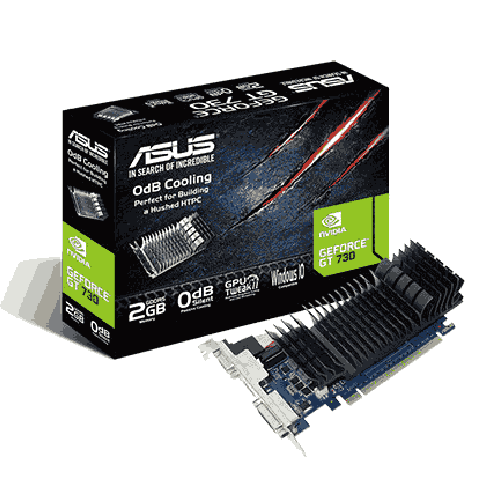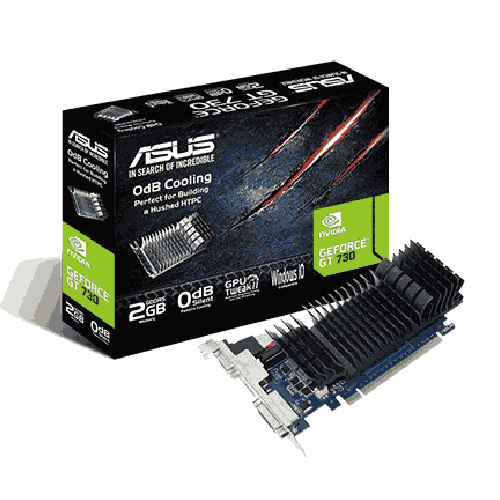
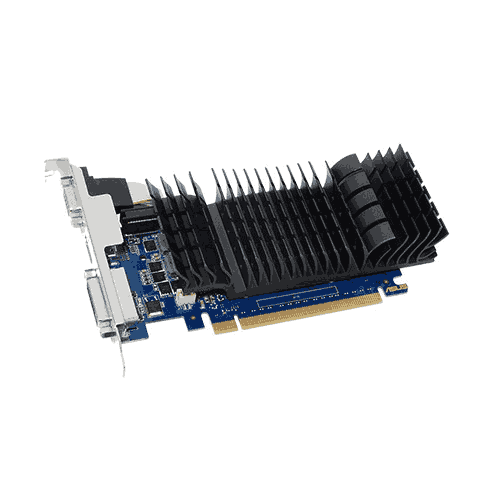

Asus GeForce GT 730 2GB GDDR5 Graphics Card
Regular Price:৳0.00Availability: SKU: 9.94.14.9110
Quick Overview
-
Support
Saturday – Thursday: 09 AM - 06 PM. -
Payment
Cash on Delivery | Card | Online Payment -
Shipping Cost
Inside Dhaka 100tk | Outside Dhaka 150tk -
Warranty Policy
Read More
Description
Asus GeForce GT 730 2GB GDDR5 Graphics Card Price in Bangladesh
Not every PC in Bangladesh is built for gaming. Many desktops are still used for office tasks, school work, point-of-sale software, browsing, and basic media playback. And many of those PCs—especially older systems—either have weak integrated graphics or don’t provide the display options you need today. That’s where a simple, reliable graphics card makes sense.
The Asus GeForce GT 730 2GB GDDR5 Graphics Card is designed for exactly this practical role. It’s a budget-friendly discrete GPU that focuses on giving your PC stable display output, smoother everyday visuals than basic onboard graphics (in many older systems), and extra flexibility for multi-monitor use—without demanding a big power supply upgrade or a new PC build.
In other words, it’s the kind of graphics card you buy when your goal is not ultra gaming performance, but a smoother, more usable PC experience.
Important accuracy note: You provided the product name and memory type/capacity. You did not confirm the exact ASUS model variant, clock speeds, output ports (HDMI/DVI/VGA/DP), whether it is low-profile or standard, bus width, power draw, or PCIe version. Because accuracy is non-negotiable, those details are intentionally omitted here and discussed only as buyer checklists.
What the GT 730 is best for (and what it isn’t)
The Asus GeForce GT 730 2GB GDDR5 Graphics Card is best for:
- Everyday office and home use
- Adding or improving display output on older PCs
- Supporting multiple monitors (depending on the specific port configuration)
- Basic media playback and general UI smoothness improvements in some older setups
- Lightweight, older, or very low-demand games at low settings (expectations should be realistic)
It is not intended for modern AAA gaming. If your main purpose is gaming at 1080p in modern titles, you should consider a newer GTX/RTX class GPU. But if your goal is to run Excel, browser tabs, ERP software, Zoom meetings, and basic video playback reliably—this card can be a sensible, affordable upgrade.
Why “2GB GDDR5” matters in the GT 730 world
The GT 730 has existed in multiple variants across the market over time, including different memory types. The GDDR5 version is generally preferred by buyers because, within the GT 730 family, GDDR5 typically offers better memory performance than older DDR3 variants.
For Bangladesh buyers, this is a key practical point: if you’re choosing a GT 730, the 2GB GDDR5 model is typically the one people look for when they want the best possible experience from this entry-level card category.
This doesn’t turn it into a gaming GPU—but it does improve how the card handles everyday graphics tasks and some lightweight workloads.
The real Bangladesh value: fixing “display problems” without replacing the whole PC
A huge number of people buy entry GPUs like the Asus GeForce GT 730 2GB GDDR5 Graphics Card for one of these reasons:
- Their motherboard display output is limited or unstable
- They want to connect a modern monitor, but their current outputs don’t match
- They want a second monitor for work
- Their PC is older and struggles with basic graphics tasks
- They want a low-cost way to keep a PC usable for another year or two
In Bangladesh, this is extremely common for home offices, tuition centers, small businesses, and schools where upgrading the entire PC is not always the first choice. A GT 730 can extend the life of a desktop by giving it more flexibility in how it drives displays.
Office productivity and daily use: what improves
While a GT 730 won’t make your CPU faster, it can make the PC feel more stable visually—especially on older machines with weak integrated graphics. Users often notice improvements in:
- Smoothness when working with higher-resolution monitors (system dependent)
- Better multi-display support for productivity
- More stable performance in certain apps that benefit from a discrete GPU for rendering the UI
This is particularly useful in Bangladesh offices where people keep multiple windows open: browser tabs, Excel, accounting software, messaging apps, and video calls.
Multi-monitor setups: a common Bangladesh need
Two screens can significantly improve productivity—especially for office work, sales desks, reception counters, and small businesses. The GT 730 is commonly used for multi-monitor setups, but the exact monitor support depends on the card’s physical ports and its supported configurations.
Because you didn’t specify the exact ASUS GT 730 model (ports vary), here’s the safe buying advice:
- Confirm the ports on the card match your monitor (HDMI/DVI/VGA/DP).
- Confirm whether you want to run two monitors simultaneously and which ports are usable at the same time.
- Confirm you have the correct cables or adapters.
If you share a product photo or port list, I can tailor this page to that exact variant.
Lightweight gaming and entertainment: set expectations correctly
Some Bangladesh users also want to play older games or lighter titles. A GT 730 GDDR5 can run older or less demanding games at low settings, but it is not a modern gaming card.
If your primary goal is:
- Playing esports titles smoothly at 1080p, or
- Running modern games with good graphics,
then you should look at newer GPUs.
But if your goal is occasional casual gaming, older titles, or very lightweight games, GT 730 can be a budget-friendly solution.
Compatibility checklist (Bangladesh buyers should check before ordering)
Before buying the Asus GeForce GT 730 2GB GDDR5 Graphics Card, check:
1) Your PC’s motherboard slot
You’ll need an available PCIe x16 slot.
2) Your power supply quality
Many entry GPUs like GT 730 can run on basic PSUs, but PSU quality still matters. Since exact power requirements were not confirmed, confirm whether the card needs any external power connector (many variants do not, but do not assume).
3) Your case size
If your PC is a slim or small form factor, you may need a low-profile version. Since low-profile status isn’t confirmed, verify your case compatibility.
4) Your monitor ports
Confirm the card’s output ports match your monitor inputs so you don’t end up with adapter issues.
5) Your operating system and drivers
Make sure your OS supports the GPU drivers for stable use.
Bangladesh usage scenarios where GT 730 makes sense
Office desktop upgrades
For Excel, web apps, printing workflows, and multi-monitor productivity.
School/college computer labs
A budget way to add display flexibility and keep older PCs usable.
Small business POS and counters
Stable display output for billing software and daily operations.
Home PCs for students
Online classes, browsing, documents, and general use without buying a new PC.
Dual-monitor workstations (variant dependent)
Improved multitasking for accounting, admin tasks, and content review.
Maintenance and care for Bangladesh conditions
- Keep the PC clean from dust; dust can reduce airflow even on low-power systems.
- Ensure stable power; consider a UPS for sensitive office environments.
- Keep drivers updated where possible to maintain compatibility and stability.
- Avoid blocking case vents, especially in warm months.
Overall, the Asus GeForce GT 730 2GB GDDR5 Graphics Card is a practical, low-cost solution for Bangladesh users who need better display output, multi-monitor flexibility (variant dependent), and an affordable way to extend the life of older desktop PCs.
✅ Key Features
- 2GB GDDR5 Memory: A preferred GT 730 memory type for better entry-level performance compared to DDR3 variants.
- Budget Discrete GPU Upgrade: Adds dedicated graphics output for older PCs and office desktops.
- Everyday Display Stability: Helps improve display flexibility for daily tasks and multi-screen setups (variant dependent).
- Older PC Life Extension: A cost-effective way to keep legacy desktops usable for work and study.
- Productivity-Friendly Use: Supports office workflows like spreadsheets, browsing, and multi-window tasks.
- Multi-Monitor Potential: Useful for dual display productivity depending on available ports.
- Low-Complexity Upgrade Path: Suitable for users who want a simple GPU installation without building a gaming PC.
- Bangladesh Office and Home Fit: A sensible option for small businesses, tuition centers, and home study PCs.
- Simple Compatibility Requirements: Works with standard PCIe x16 systems (confirm case/PSU suitability).
- Value-Oriented Purchase: Focused on practical utility rather than gaming horsepower.
✅ Usage / Applications
- Office work and productivity PCs
- Upgrading older desktops with weak integrated graphics
- Connecting one or two monitors for multitasking (variant dependent)
- POS counters and billing software desktops
- Online classes, document work, and browsing for students
- Basic media playback and everyday entertainment
- Computer lab maintenance upgrades
- Legacy PC support for small businesses
- Lightweight/older games at low settings (expectations required)
- Display output expansion when motherboard ports are limited
✅ Benefits of This Product?
- Affordable display upgrade: Improves display options without replacing the whole PC.
- Better GT 730 variant choice: GDDR5 memory is typically preferred within the GT 730 lineup.
- Improved productivity setup: Supports multi-monitor workflows depending on ports.
- Extends old PC usefulness: Keeps older desktops usable for work and education.
- Low-cost business solution: Practical for shops, counters, and office desks.
- Simple installation path: A straightforward upgrade for many standard desktop systems.
- Reduced adapter headaches (when ports match): Helps connect monitors properly if you choose the right variant.
- Bangladesh-friendly value: Fits budget-focused upgrade decisions common in local markets.
✅ Ideal For
The Asus GeForce GT 730 2GB GDDR5 Graphics Card is ideal for Bangladesh users who need a budget-friendly graphics solution for office, education, and everyday home computing. It’s a strong fit for small businesses running POS/billing software, offices that need a second monitor for productivity, and schools or training centers maintaining older desktops.
It also works well for students who need a simple PC for online classes, documents, and browsing, especially when the existing PC’s integrated graphics are weak or the motherboard display ports are limited. If your goal is practical display output and stability—not modern AAA gaming—this GT 730 GDDR5 model is a sensible, cost-effective upgrade in Bangladesh.
✅ Why Choose the Asus GeForce GT 730 2GB GDDR5 Graphics Card?
When your PC is slow in games, you buy a gaming GPU. But when your PC is limited by display outputs, weak integrated graphics, or the need for a second monitor, you buy a practical card like the Asus GeForce GT 730 2GB GDDR5 Graphics Card.
This model is popular because it targets common real-life problems: older desktops that can’t comfortably drive modern monitors, office PCs that need dual displays, and systems that require a dedicated graphics output for stable daily use. The 2GB GDDR5 memory is the key choice within the GT 730 family—GDDR5 variants are typically preferred because they offer better performance than DDR3 variants in similar GT 730 cards.
Another reason it’s a smart choice is simplicity. Many users in Bangladesh don’t want to upgrade their entire PC. They want a cost-effective improvement that keeps a desktop useful for work, study, and basic entertainment. The GT 730 fits that role well.
Finally, choosing ASUS is appealing for many buyers because ASUS is a widely recognized brand in the PC hardware ecosystem. If you want a simple, budget GPU that improves display flexibility and keeps an older PC productive, this card is a practical choice.
✅ Why Buy This Product from BME?
Buying an entry-level graphics card in Bangladesh still benefits from proper guidance—because GT 730 models can differ by port configuration and form factor. When you buy the Asus GeForce GT 730 2GB GDDR5 Graphics Card from Business Machine & Equipment (BME), you can get help confirming which variant you are ordering, whether it matches your monitor inputs, and whether it fits your PC case.
BME can also help you avoid common buying mistakes—like purchasing a standard-height card for a slim case, or buying a port configuration that doesn’t match your monitor cables. This matters a lot in Bangladesh where older PCs and older monitors are common, and adapters can become an unnecessary hassle.
For offices, schools, and organizations, BME can support procurement-style requirements such as quotations and documentation when needed, making it easier to purchase for projects or lab upgrades.
If you want a practical GPU upgrade with Bangladesh-friendly buying support, ordering from BME is a dependable choice.
✅ Buying Guide
Use this checklist to choose the right GT 730 variant and avoid compatibility issues.
Step 1: Confirm your purpose
If your goal is office work, display output, and basic everyday use, GT 730 is suitable. If you want modern gaming, consider a stronger GPU.
Step 2: Confirm the memory type is GDDR5
GT 730 cards exist in multiple memory types in the market. You specifically want the 2GB GDDR5 version for better performance within this family.
Step 3: Check your monitor ports
Look at your monitor input (HDMI/VGA/DVI/DP) and confirm the GT 730 variant you’re buying has matching outputs.
Step 4: Confirm case form factor
If your PC case is slim (SFF), you may need a low-profile card. Confirm the form factor before ordering.
Step 5: Confirm PSU and power connector needs
Most GT 730 cards are low-power, but don’t assume. Confirm whether the card needs external power and whether your PSU is in good condition.
Step 6: Avoid common mistakes
- Buying the wrong port configuration and needing adapters
- Choosing the wrong form factor for your case
- Expecting modern AAA gaming performance from a display-focused GPU
- Neglecting dust cleaning and then facing overheating in older cases
✅ Customers Ask About / Frequently Asked Questions
✅ Q1: Is the ASUS GT 730 2GB GDDR5 good for gaming?
✅ A: It’s best for basic/light gaming and older titles. It’s mainly intended for everyday display and office use rather than modern AAA gaming.
✅ Q2: Is GDDR5 better than DDR3 on GT 730?
✅ A: Generally, yes. GT 730 GDDR5 variants are typically preferred for better performance than DDR3 variants within the same family.
✅ Q3: Can I use it for dual monitors?
✅ A: Many GT 730 variants support dual displays, but it depends on the exact port configuration. Confirm the ports of your specific ASUS model.
✅ Q4: Will it work on an older desktop PC?
✅ A: If your PC has a PCIe x16 slot and adequate PSU health, it should work. Confirm case space and port needs.
✅ Q5: Does it need an external power connector?
✅ A: Many low-power cards do not, but it depends on the exact model. Confirm this from the product specs or box.
✅ Q6: Is it good for online classes and office work?
✅ A: Yes. It’s a practical GPU for display output and everyday PC use.
✅ Q7: Is it suitable for Bangladesh voltage and power conditions?
✅ A: The GPU itself runs from the PC’s PSU. Use a quality PSU and consider UPS/voltage protection in areas with unstable power.
✅ Q8: What drivers do I need?
✅ A: Install the appropriate NVIDIA drivers compatible with your operating system for best stability.
✅ Q9: What warranty should I expect in Bangladesh?
✅ A: Warranty terms vary by seller and stock source. Confirm BME’s warranty policy at purchase time.
✅ Q10: How do I choose the right GT 730 variant from BME?
✅ A: Confirm the exact output ports, whether it is low-profile or standard, and your monitor cable needs before ordering.
✅ Why Buy This Product
If you need an affordable, practical graphics card for an older PC in Bangladesh, the Asus GeForce GT 730 2GB GDDR5 Graphics Card is a smart solution. It’s designed for everyday tasks—office productivity, browsing, online classes, and stable display output—while also giving you the flexibility to run multiple monitors depending on the exact port configuration. The 2GB GDDR5 version is typically the preferred GT 730 choice, offering better performance than DDR3 variants commonly found in the market.
Whether you’re upgrading an office desktop in Dhaka, maintaining older PCs in a training center, or building a simple home computer for students, this GPU delivers practical value without requiring a full PC replacement. Order the Asus GeForce GT 730 2GB GDDR5 Graphics Card from BME today and extend your PC’s usefulness with a straightforward display upgrade.
What is the price of Asus GeForce GT 730 2GB GDDR5 Graphics Card in Bangladesh?
Write a review
Question Answer
Have question about this product? Get specific details about this product from expert.